NicePlayer uses Perian to make your media viewing experience the best
Perian would like to highlight the included third-party software libraries
- libavcodec from the ffmpeg project, with code based on FFusion
- libavformat from the ffmpeg project, with code based on AviImporter
- libmatroska, with code based on MatroskaQT
- liba52
- Mozilla’s Universal Charset Detector
Perian source code is available under the LGPL v2.1 or later
We offer a mailing list to communicate and collaborate
- Join the Perian mailing list to discuss features, ask questions, report problems, and follow happenings in the community.
We are proud to offer links to related software in the community
- Perian can be used with all QuickTime-supporting apps, including QuickTime Player, NicePlayer, and QTAmateur.
- The Flip4Mac (Windows Media) and XiphQT (Ogg) components add support for some formats not included in Perian.
- The internet TV platform Miro and Airport Express streaming app Airfoil include Perian.
The Perian Project would like to thank special contributors
- Jérôme Cornet of FFusion and Christoph Nägeli of XviD_Codec for the AviImporter.
- FFmpeg for providing such a rich audio/video codec library.
- Dag Ågren and the Mozilla Foundation for the universal Charset Detector.
- Matroska for the audio/video container libraries.
- Perian software downloads are provided by Cachefly, Thanks!
Installation and Removal of Perian
Please consider removing obsolete QuickTime Components: FFusion, Xvid Delegate, 3ivX, DivX, DivX Decoder, XviD, msmpeg4v1, msmpeg4v2, AviImporter, EX_M4S2, Casio AVI Importer, AC3 Codec, and MatroskaQT.
How do I remove Perian?
Open the System Preferences. Select the Perian pane and ‘Remove.’ Now ‘Show All’ preference panes, control-click the Perian pane and ‘Remove «Perian» Preference Pane.’
Frequently Asked Questions
Why does it take so long for MKV to load?
QuickTime expects to know the location of every single frame in a movie in order to play it. This is easy with its native format, MOV/MP4, but more difficult for several others, including MKV. Perian has to read in the entire file in order for seeking and playback to work.
Does hardware acceleration for H.264 work with Perian?
QuickTime supports hardware acceleration for some profiles of H.264; however, which profiles these are is not documented and may change on different Mac models. We do our best not to interfere, and some MKV files are known to work with hardware-accelerated decoding.
I thought Perian allowed me to play MPEG files, but it can’t. Why?
The term MPEG covers more than just a file type; it also defines audio and video compression methods. Perian allows playback of these audio and video compression techniques, but it does not allow the ability to open the MPEG file format. This is due to limitations within QuickTime itself, and we cannot solve it until Apple designs a better interface. See our rdar on the subject.
Will there be a version of Perian for the iPhone?
Unfortunately no, the iPhone does not have QuickTime. Since Perian is a third party component for QuickTime, we would need the iPhone to have QuickTime before we could get Perian onto the iPhone.
What if QuickTime for the iPhone ends up in a future update?
We are concerned that the iPhone, while a great device, is just too slow to play the type of files that you would use Perian to play.
I submitted a bug report and I was told it was fixed in SVN; what does this mean?
SVN refers to the system which the developers use to store the source code that makes Perian. If an issue has been fixed in SVN, then that means the developers have tracked down the issue, and believes it to be fixed. At this stage, it requires further testing after which it will be included in the next release.
Perian — швейцарский ножик для QuickTime
 На прошлой неделе вышла финальная версия первой версии Perian, бесплатного пакета наиболее популярных видеокодеков для проигрывателя QuickTime.
Набор кодеков Perian добавит QuickTime Player, а заодно и используемым с ним программам, поддержку различных медиа-форматов: MS-MPEG4 v1 и v2, DivX, 3ivX, H.264, FLV1, FSV1, VP6, H263I, VP3, HuffYUV, FFVHuff, MPEG1 и MPEG2 Video, Fraps, Windows Media Audio v1 и v2, Flash ADPCM, Xiph Vorbis, MPEG Layer II Audio. Также Perian обеспечивает поддержку файлов AVI, FLV, MKV и субтитров SSA и SRT.
В финальной версии была поправлена работа некоторых кодеков и улучшен инсталлятор, благодаря чему сейчас мы имеем удобный пакет, снимающий вопросы несовместимости в штатном проигрывателе Mac OS X. Ну лично у меня такие вопросы после установки Perian отпали 🙂
Как воспроизвести на Маке любое видео?
Вынесенный в заголовок вопрос — один из самых популярных у новичков. Действительно, вызывает удивление тот факт, что «самая совершенная система в мире» Mac OS X не может воспроизвести заурядный .avi файл.
Официальное решение проблемы довольно дурацкое — есть дополнительные компоненты для QuickTime, которые вам придётся по одному скачивать с сайтов производителей (иногда даже за деньги).
Но, к счастью для всех, есть и неофициальное решение… Решение это — проект Perian, который фактически стал стандартом среди видео- и аудиокодеков для Мака. Эту маленькую, бесплатную и чертовски полезную вещь можно скачать с сайта проекта (ссылка внизу страницы).
Perian реализован в виде дополнительной панельки настроек системы. По двойному щелчку она добавится к остальным пультам настроек Mac OS:
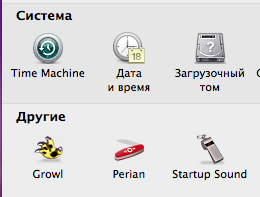
В принципе, на этом весь процесс настройки заканчивается. Но если вам интересно, то можете ознакомиться с опциями Perian:
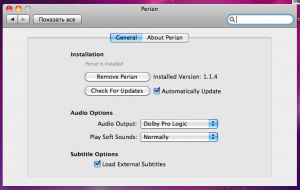
Настройки Perian
Всё, что вам предлагается — это возможность безопасно удалить Perian (кнопка Remove), настроить автоматическое обновление (Check For Updates), отрегулировать выход и усиление звука и включить субтитры.
Гарантируем, что заглядывать в этот пульт настроек вам вряд ли придётся — Perian отлично работает. После его установки QuickTime сможет воспроизводить в разы больше форматов видео. Для тех, кому интересны подробности, приводим цитату с сайта производителя:
Верно сказано, что всё гениальное — просто. Perian — один из примеров тому. И хотя кому-то, возможно, не понравится отсутствие возможности тонко настроить каждый кодек, большинству пользователей лишние сложности не нужны.
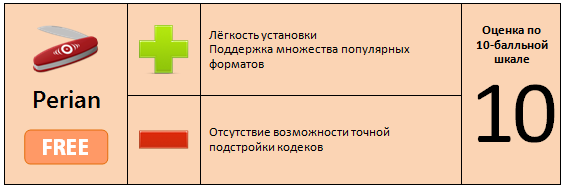
Скачать Perian (3,6 МБ)