RIA Services
We use Open RIA Services, which is the official replacement by Microsoft when RIA Services was discontinued.
- Either use version 5, but there are some API differences compared to the original RIA Services for Silverlight from 2011
- or use version 4.6 (recommended), but code generation is not functional at this time, you need to copy the generated files from your Silverlight solution (for now)
NuGet Packages
Version 4.6 (Recommended)
Version 5
Example
Source code
Roadmap
- Fix code generation in version 4.6 of Open RIA Services
Instructions
The original documentation for WCF RIA Services is still relevant and can be found at https://msdn.microsoft.com/en-us/library/ee707344(v=vs.91).aspx . Namespaces and assembly names are no longer correct since they changed with the release of OpenRiaServices.
Documentation for changes since WCF RIA Services can be found under https://github.com/OpenRIAServices/OpenRiaServices/releases)
A step-by-step guide to migrate Silverlight and OpenSilver projects from WCF RIA to OpenRIA Services
In this example it is shown how to migrate Silverlight application to OpenSilver.
If the project uses WCF RIA services then the beginning steps are the same but then compilation errors are expected.

It is not required to have Silverlight project migrated to OpenRIA Services before OpenSilver migration but it can be useful for testing purposes.
Migration steps are similar for both Silverlight and OpenSilver projects. The main difference is package versions.
If nothing is mentioned then the instruction refers to both.
1. Install nuget packages
There are two types of projects: Client-side and Server-Side
- Silverlight project
- OpenSilver project
- Silverlight project
- OpenSilver project
Depending on project type it might be required to install other packages as well. For example if Soap and Json Ria Endpoints are used then install the following package as well.
Projects that are referenced by Server-side
Remove reference to System.Data.Entity and replace that with nuget package:
Replace using System.Data with using System.Data.Entity.Core
As you can see for Silverlight projects versions 4.6.0 are used because version 5.0.0 drops Silverlight support. For OpenSilver project version 5.0.0-preview0003 is used. This is required for code generation and everything to work fine.
2. Find and replace System.ServiceModel.DomainServices* with OpenRiaServices.DomainServices* everywhere
Use OPENSILVER compiler directive to keep original code working.
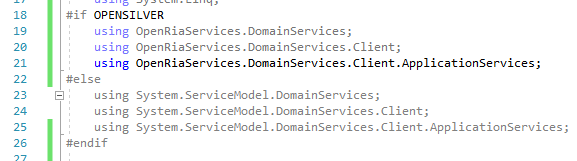
Please note that you can also use "Find and Replace" feature but regular expressions need to be enabled in order to be able to generate multiline code.
3. Auto code generation
If all above packages are installed with required versions then code generation will work fine.
4. web.config
If the project contains web.config, then go through the web.config and remove any references to System.ServiceModel.DomainServices and add the corresponding references to corresponding OpenRiaServices assemblies instead.
Here are common entries
5. Add LinkedOpenRiaServerProject tag
If the original Silverlight application has LinkedServerProject tag then add LinkedOpenRiaServerProject with the correct project name in PropertyGroup. The same applies for RiaClientUseFullTypesNames -> OpenRiaClientUseFullTypeNames
Wcf ria services что это
Completing the CAPTCHA proves you are a human and gives you temporary access to the web property.
What can I do to prevent this in the future?
If you are on a personal connection, like at home, you can run an anti-virus scan on your device to make sure it is not infected with malware.
If you are at an office or shared network, you can ask the network administrator to run a scan across the network looking for misconfigured or infected devices.
Another way to prevent getting this page in the future is to use Privacy Pass. You may need to download version 2.0 now from the Chrome Web Store.
Cloudflare Ray ID: 71aaf1e08dec9bdd • Your IP : 82.102.23.104 • Performance & security by Cloudflare
Wcf ria services что это
WCF RIA Services — Overview
This article is relevant to entity models that utilize the deprecated Visual Studio integration of Telerik Data Access. The current documentation of the Data Access framework is available here.
WCF RIA Services simplifies the development of n-tier solutions for Rich Internet Applications (RIA), such as Silverlight applications. A common problem when developing n-tier RIA solutions is to coordinate the application logic between the middle tier and the presentation tier. In order to create the best user experience, you want your RIA client to be aware of the application logic that resides on the server, but you do not want to develop and maintain the application logic on both the presentation tier and the middle tier. RIA Services solves this problem by providing framework components, tools, and services that make the application logic on the server available to the RIA client without requiring you to manually duplicate that programming logic. You can create a RIA client that is aware of the business rules and knows that the client is automatically updated with the latest middle tier logic every time when the solution is re-compiled.
For more advanced Silverlight demos, you could refer to the Telerik Data Access Samples Kit. It is an easy to use resource browser that includes various demos and relevant information for the developers. The samples are grouped by technology (ASP.NET, Silverlight, WPF, WCF, N-Tier, etc.) and can be filtered by programming language (C# or VB) and complexity (levels 100-400). The Telerik Data Access Samples Kit is intended for browsing the code samples offline, so it should be downloaded and installed separately from the Telerik Data Access product.
Samples Kit Demos
The Telerik Data Access Samples Kit includes the Sofia Car Rental — WCF RIA Services demo, which demonstrates the best practices recommended for using Silverlight and WCF RIA services.
The topics in this section are entirely dedicated to the integration of WCF RIA Services, Telerik Data Access and Silverlight 5 applications:
- Prerequisites
- Walkthrough: Creating a RIA Services Solution
- Walkthrough: Adding Query Methods
- Walkthrough: Performing Create, Update, Delete Operations
- How to: Load Related Data
- How to: Handle Relationships
- How to: Configure Existing Applications to Use WCF RIA Services
- How to: Add Metadata Class
- How to: Validate Data
- How to: Using DomainDataSource
- How to: Error Handling
- How to: Deploy WCF RIA Service with Telerik Data Access
Copyright © 2017, Progress Software Corporation and/or its subsidiaries or affiliates. All Rights Reserved.