DESCRIPTION
The Certificate Database Tool, certutil, is a command-line utility that can create and modify certificate and key databases. It can specifically list, generate, modify, or delete certificates, create or change the password, generate new public and private key pairs, display the contents of the key database, or delete key pairs within the key database.
Certificate issuance, part of the key and certificate management process, requires that keys and certificates be created in the key database. This document discusses certificate and key database management. For information on the security module database management, see the modutil manpage.
COMMAND OPTIONS AND ARGUMENTS
Running certutil always requires one and only one command option to specify the type of certificate operation. Each command option may take zero or more arguments. The command option -H will list all the command options and their relevant arguments.
Command Options
Some smart cards do not let you remove a public key you have generated. In such a case, only the private key is deleted from the key pair.
Arguments modify a command option and are usually lower case, numbers, or symbols.
If this option is not used, the validity check defaults to the current system time.
certutil supports two types of databases: the legacy security databases (cert8.db, key3.db, and secmod.db) and new SQLite databases (cert9.db, key4.db, and pkcs11.txt).
NSS recognizes the following prefixes:
If no prefix is specified the default type is retrieved from NSS_DEFAULT_DB_TYPE. If NSS_DEFAULT_DB_TYPE is not set then sql: is the default.
The name can also be a PKCS #11 URI. For example, the NSS internal certificate store can be unambiguously specified as "pkcs11:token=NSS%20Certificate%20DB". For details about the format, see RFC 7512.
The valid key type options are rsa, dsa, ec, or all. The default value is rsa. Specifying the type of key can avoid mistakes caused by duplicate nicknames. Giving a key type generates a new key pair; giving the ID of an existing key reuses that key pair (which is required to renew certificates).
The nickname can also be a PKCS #11 URI. For example, if you have a certificate named "my-server-cert" on the internal certificate store, it can be unambiguously specified as "pkcs11:token=NSS%20Certificate%20DB;object=my-server-cert". For details about the format, see RFC 7512.
-q pqgfile or curve-name
Elliptic curve name is one of the ones from nistp256, nistp384, nistp521, curve25519.
If a token is available that supports more curves, the foolowing curves are supported as well: sect163k1, nistk163, sect163r1, sect163r2, nistb163, sect193r1, sect193r2, sect233k1, nistk233, sect233r1, nistb233, sect239k1, sect283k1, nistk283, sect283r1, nistb283, sect409k1, nistk409, sect409r1, nistb409, sect571k1, nistk571, sect571r1, nistb571, secp160k1, secp160r1, secp160r2, secp192k1, secp192r1, nistp192, secp224k1, secp224r1, nistp224, secp256k1, secp256r1, secp384r1, secp521r1, prime192v1, prime192v2, prime192v3, prime239v1, prime239v2, prime239v3, c2pnb163v1, c2pnb163v2, c2pnb163v3, c2pnb176v1, c2tnb191v1, c2tnb191v2, c2tnb191v3, c2pnb208w1, c2tnb239v1, c2tnb239v2, c2tnb239v3, c2pnb272w1, c2pnb304w1, c2tnb359w1, c2pnb368w1, c2tnb431r1, secp112r1, secp112r2, secp128r1, secp128r2, sect113r1, sect113r2, sect131r1, sect131r2
The attribute codes for the categories are separated by commas, and the entire set of attributes enclosed by quotation marks. For example:
Use the -L option to see a list of the current certificates and trust attributes in a certificate database.
Note that the output of the -L option may include "u" flag, which means that there is a private key associated with the certificate. It is a dynamic flag and you cannot set it with certutil.
Как проверить контрольную сумму файлов MD5 с помощью Certutil
 Советы
Вы только что скачали большой файл? Или у вас есть файл, на который у вас есть подозрения? Лучший способ убедиться, что файл получен из проверенного источника, это измерить его контрольную сумму . Контрольная сумма почти как отпечаток пальца файла, который нельзя изменить или удалить. Если контрольная сумма двух файлов одинакова, мы можем с уверенностью сказать, что оба файла одинаковы. Существует много алгоритмов для вычисления контрольной суммы, и мы говорим о MD5 . В этом посте мы рассмотрели метод проверки целостности файлов путем вычисления их контрольной суммы с помощью встроенного инструмента командной строки Certutil .
В этом посте показано, как рассчитать, проверить, проверить и проверить контрольную сумму файла с помощью встроенной в Windows утилиты Certutil.exe. Контрольные суммы MD5 полезны для проверки целостности файла и для определения того, совпадает ли ваш файл с исходным и не подделан ли он.
Что такое контрольная сумма MD5
Вы, наверное, часто сталкивались с этим термином при загрузке больших файлов из Интернета. MD5 – один из самых распространенных алгоритмов, используемых для измерения контрольной суммы файлов. Он часто помогает в обнаружении файлов, которые были злонамеренно изменены или искажены во время передачи/загрузки.
Как рассчитать контрольную сумму MD5 файла
Ну, есть много способов сделать это. Одним из них является помощь сторонних инструментов проверки целостности файлов. Есть много инструментов, которые могут помочь вам вычислить контрольную сумму файла, используя алгоритмы MD5. Мы уже рассмотрели несколько инструментов, которые вы можете проверить здесь.
Если вы ищете альтернативу, не требующую загрузки какого-либо другого дополнительного инструмента, Windows Certutil может вам помочь. Certutil – это инструмент командной строки, встроенный в Windows.
Согласно Microsoft, вы можете использовать certutil.exe для получения и отображения информации о конфигурации центра сертификации (CA), настройки служб сертификации, резервного копирования и восстановления компонентов CA, а также проверки сертификатов, пар ключей и цепочек сертификатов.
В этом разделе мы рассмотрели пошаговое руководство по использованию Certutil для вычисления контрольной суммы любого файла.

Шаг 1. Откройте новое окно CMD в меню Пуск.
Шаг 2: Перейдите в каталог, где находится ваш файл.
Шаг 3: Запустите следующую команду:
Это напечатает контрольную сумму файла в окне консоли. Вы можете использовать эту контрольную сумму для проверки целостности этого файла.
Работаете с другими алгоритмами?
Если вы хотите проверить контрольную сумму по другому алгоритму, такому как SHA512 или SHA256, все, что вам нужно сделать, это заменить MD5 в вашей команде желаемым алгоритмом.
Проверка контрольной суммы
Как только вы получили значение контрольной суммы, пришло время проверить это. Если вы получили этот файл от друга или по электронной почте, вы можете запросить у отправителя значение контрольной суммы. Если оба значения совпадают, ваш файл не был подделан или искажен во время передачи. Если вы загрузили этот файл с веб-сайта, вы можете посмотреть на странице загрузки контрольные суммы, упомянутые разработчиком.
На скриншоте ниже вы можете увидеть контрольную сумму, упомянутую на странице загрузки FileZilla. Это та же контрольная сумма, которая была рассчитана Certutil на предыдущем шаге.

Так вот как вы можете рассчитать и проверить контрольные суммы MD5 ваших файлов. Эти контрольные суммы могут легко идентифицировать искажения файла и подделанные файлы. Хотя существует множество бесплатных онлайн и офлайновых инструментов, которые позволяют вам это делать, но знание этого трюка с Windows всегда полезно.
Introducing to Certutil
As it was mentioned, certutil.exe tool is one of two main cryptographic utilities in Windows and exists since Windows NT4 Option Pack. In Windows 2000 and Windows XP (Windows Server 2003), the tool was a part of “AdminPack” package or “Support Tools”. Starting with Windows Vista and Windows Server 2008, certutil is shipped with every installation by default and no extra download or installation is required. Certutil greatly evolved over years and latest version is very powerful. The full list of commands can be retrieved by calling standard command-line tool help query:
The command outputs the top-level commands. Every top-level command has context commands and their usage is queried accordingly:
There is a verbose switch that dumps more detailed output. Put -v switch in the beginning of any other parameter to get extended output. In addition, there is an undocumented switch that shows hidden and (of course) undocumented top-level commands:
This switch is case-sensitive.
Parse certificates revocation lists
Certutil can easily parse certificates, either from file or certificate store by using -dump parameter. In fact, this is default parameter, so you can omit this parameter when decoding the file:
Here is the decoded dump of my website SSL certificate. The dump includes all the information stored in the certificate is readable way. The same command can be used to decode CRL files, PKCS#10 certificate requests, Certificate Trust Lists (CTL), PKCS#7, digitally-signed catalog file, public/private keys and so on. There is no need to specify exact cryptographic object type — certutil is smart enough to determine the embedded object type and apply required decoder. That is:
Same here, certutil automatically determined the type of a file. And certutil don’t rely on file extension, it relies on actual file content. In addition, certutil don’t care whether the file has pure binary (DER) encoding, or base-64 encoding. Certutil will make all decoding stuff automatically when necessary. Just to add an example of how certutil decodes OCSP responses:
Getting ASN.1 dump
Entire X.509 infrastructure relies on an Abstract Syntax Notation One (ASN.1) specification and Distinguished Encoding Rules (DER) to represent cryptography objects in streams. Certutil allows you to decode cryptographic objects in ASN.1 structures by using -asn parameter:
ASN decoder is very generic, it doesn't care about object type embedded in the file, it just decodes raw ASN.1 stream. That is, certutil –dump may not support some rarely used cryptographic objects, but ASN.1 decoder does support any if it is encoded by using ASN.1 encoding. There is neat thing: certutil can transform this dump back to a original binary stream. I’ll show this in next posts.
Parsing certificates from Windows Certificate Store
All techniques shown above used a file system to get input objects. Certutil can decode cryptographic objects (certificates, CRLs and CTLs) from Windows Certificate Store without having to export them to a file. Use -store parameter to access local machine store. In order to access current user store, add -user modifier:
Certutil shows only basic data about the certificate and private key (when private key is presented). We can add -v (which stands for "verbose") modifier to get verbose output:
In addition to certificate itself, certutil displays all certificate store-attached properties. Properties goes after “signature hash” line. In the store object identifier you pass object’s thumbprint. Microsoft CryptUI dynamically adds Thumbprint field (which is not a part of cryptographic objects):
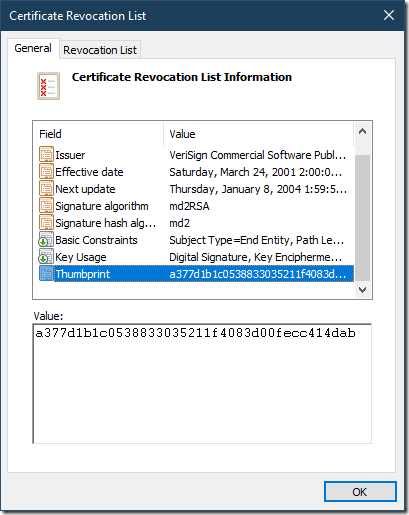
You will supply this value to certutil:
We didn’t use -user modifier, because this particular CRL is installed in the local machine store, not current user store (certutil defaults to local machine store).