Генератор системных IP-ядер (CORE Generator & Architecture Wizard)
Теперь рассмотрим более мощные средства для создания сложных элементов принципиальной схемы ПЛИС с помощью встроенного в САПР Xilinx ISE 10.1.i – Генератор системных IP-ядер (CORE Generator & Architecture Wizard). Это очень необходимый и удобный инструмент для разработчика. Он содержит в себе специальные генерируемые библиотеки символов, оптимизированные под конкретное семейство ПЛИС. Можно пользоваться и стандартной библиотекой элементов и на их основе строить более сложные узлы разрабатываемой схемы, но бывают моменты, что разрабатываемая схема должна работать, а она не работает. Это происходит из-за того, что разработчик не учитывает реальные задержки распространения сигнала внутри ПЛИС при работе на высоких скоростях, что на практике бывает очень часто. Поэтому рано или поздно придется воспользоваться данным средством — IP (CORE Generator & Architecture Wizard) и надо набраться терпения, чтобы понять как правильно использовать данное решение в своих разработках.
Вызываем Помощник создания нового источника (New Source Wizard) -> IP (CORE Generator & Architecture Wizard) и задаем имя файла – IP_CORE:

Выбираем необходимое для проекта IP-ядро из целого перечня готовых IP-ядер и следуем инструкциям Помощника создания нового источника:

Соглашаемся с выведенным в диалоговом окне отчетом о проделанной работе и нажимаем кнопку Finish:

Запускается диалоговое окно Генератора системных IP-ядер для выбранного IP-ядра – Distributed Memory Generator:

Далее разработчику предоставляется выбрать все необходимые параметры, которые должен сгенерировать Генератор системных IP-ядер, в частности ширину данных (Data Width), количество данных (Depth – глубина), тип создаваемой памяти (Memory Type):

В следующем окне предлагается выбрать входные и выходные параметры и опции, назначение которых более подробно можно посмотреть в описании на данное IP-ядро, которое вызывается при нажатии на кнопку View Data Sheet. Для простоты пока не будем ничего менять и продолжим работу дальше, нажав на кнопку Next:

А вот следующее диалоговое окно рассмотрим обязательно:

Данное окно предназначено для задания специального файла коэффициентов с расширением *.coe, в котором задаются постоянные или временные начальные данные. Прежде чем начать заполнение данного окна надо с начала создать в любом простом редакторе (Блокнот) сам файл с расширением *.coe по определенному правилу, который определяет правильный формат написания подобного файла:

После того, как файл rom_ip_core.coe будет сформирован и сохранен в рабочем каталоге разрабатываемого проекта, его можно добавлять с помощью кнопки Browse…, которая вызывает диалоговое окно Open:

Таким образом, добавляется Файл коэффициентов (Coefficients File):

Для проверки или просмотра заданных коэффициентов служит кнопка Show…, которая вызывает диалоговое окно для просмотра данных коэффициентов:

Для завершения работы Генератора системных IP-ядер для генерирования нашего IP-ядра нажимаем на кнопку Finish. Обращаю внимание на то, что процесс генерации IP-ядра требует некоторого времени, и в окне Сообщений нужно дождаться надписи – Successfully generated IP_CORE:

В САПР Xilinx ISE 10.1i осталась не большая недоработка, которая приводит к тому, что не всегда можно сразу добавить созданное IP-ядро в схемотехническом редакторе, даже если попытаться обновить изображение схемы нажатием по рабочему полю схемы ПЛИС. Поэтому рекомендую закрывать схемотехнический редактор. Проверить наличие создания IP-ядра в окне Источников (Sources for: ….):

Снова войти в схемотехнический редактор, и добавить IP-ядро в разрабатываемую схему ПЛИС точно так же, как добавляли новый символ — SYNC:

При этом, в редакторе символа можно уменьшить размер и переместить название символа как показано ниже:

При правильной работе САПР Xilinx ISE10.1i при создании IP-ядра выводит диалоговое окно, в котором нужно нажать кнопку Update, далее кнопку OK:
IP Cores For FPGA Designs
Intellectual property (IP) cores are standalone modules that can be used in any field programmable gate array (FPGA). These are developed using HDL languages like VHDL, Verilog and System Verilog, or HLS like C.
IP cores are part of the growing electronic design automation (EDA) industry. In this article, these will be discussed with respect to SRAM based FPGAs.
Let us take an example of universal asynchronous receiver-transmitter (UART) IP block, which is intended to be used in different applicatons. The developed UART IP core module should:
• Meet basic UART functionalities
• Be portable, so that it can be used in any vendor technologies; for example, Xilinx/Altera as plug and play
• Have user-configurable parameters (like baud rate)
• Have processor interface/generic parameter file to modify configurations as required
• Provide IP data sheet
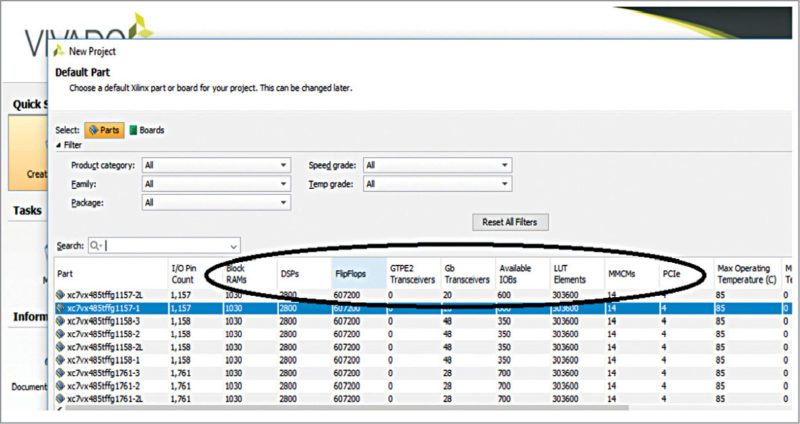
Fig. 1: Xilinx Vivado – FPGA selection overview includes hard blocks
Types of IP cores
IP cores can be categorised as hard IP core, firm IP (semi-hard IP) core and soft IP core.
Hard IP cores.
These are part of the FPGA-independent modules; for example, PCIe or Ethernet IP modules available in Xilinx FPGA. You have to configure the location and provide interface connectivity with other modules, clocks and resets. Since these blocks are already part of the FPGA device, these will not be taken into account while calculating the utilisation of the slice logic report. In the utilisation summary, these will be counted as the number of PCIe/Ethernet blocks used. Because of a fixed location in the FPGA, these cores cannot be ported to other FPGAs. Neither can these be reused like HDL components, if already used in the FPGA.
Fig. 1 shows Xilinx Vivado tool – FPGA selection window for Virtex-7 FPGA with internal hard IP details for creating the project. The number of hard IPs may vary between different FPGA families.
Fig 2. shows the dedicated location of the hard IP in Virtex-7 FPGA.
Unmarked (not labelled) areas (between DSP slice and block RAM, or block RAM and PCIe, or PCIe and transceivers) in the FPGA (Fig. 2) contain large distribution of flip-flops, latches, multiplexers, LUTs, etc. Soft IP cores or custom logic are implemented in these areas.
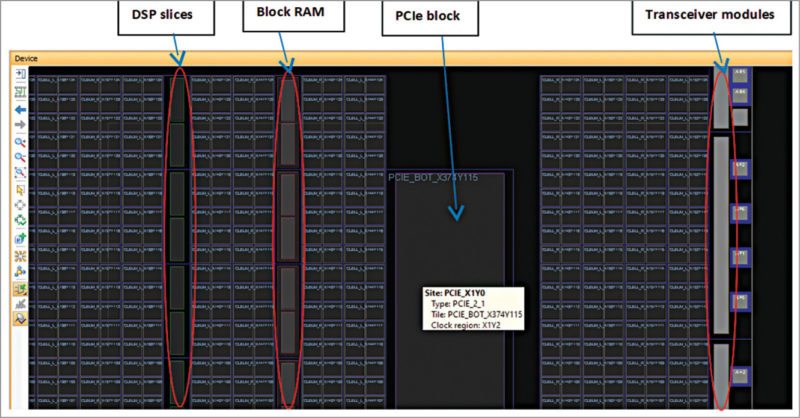
Fig. 2: Xilinx Vivado – Virtex-7 FPGA hard IP core locations
Advantages include:
• Timing violations minimised
• No extra cost, that is, cost of the hard block is included in the FPGA; hence, can be considered as low-cost compared to other two types of IP cores
• No individual licence, except for compiler tool licence
• RTL code maintenance reduced
• No extra documentation required; for each IP level, documentation provided by vendor
• For slice/LUT summary, hard IP cores not considered
• Low dynamic and static power can be achieved if hard IP blocks are used in the designs
• Functionality and performance guaranteed
• Fully-tested and with known errors/limitations, if any, as per documents provided by vendor
Disadvantages include:
• Not portable; these are highly optimised and targeted at specific FPGAs
• Fixed implementation with pre-defined constraints
• Limited availability of number of hard IPs with respect to particular FPGAs
Firm IP cores.
Firm IP cores are also known as semi-hard IP cores. These are a form of gate-level netlist, where you have the flexibility to place the module in the FPGA as per usage and with minimal user-programmable configurations.
For example, if a third-party IP is targeted at Xilinx FPGA, then the IP provided will be .ngc file. You can integrate this file with your project and instantiate it as a component in the top level to interconnect with other modules, and then proceed with synthesis.
To use a firm IP core, you should have proper FPGA resource planning and requirement specifications before procuring the IP for the project.
Xilinx Coregen-generated IP cores (like FIFO, shift registers and memory interface cores) can be grouped into the firm IP core category. You have to include .ngc/.xco in the project directory (for Xilinx), and specify the instantiation in the top file. Instantiated components can be moved around within the FPGA to meet performance and timing.
Advantages are:
• Modifications allowed to some extent
• Functionality and performance are measurable
• Resource utilisation considers firm IP logic area
• Completely tested
• Documentation may be available up to some level
Disadvantages are:
• Limited portability
• Modifications to source not possible
• May be licensed based on cost
• Source utilisation matters while considering the FPGA
• Timing/performance may have impact
Soft IP cores.
These are completely flexible and do not depend on vendor technology. These can be ported across various FPGA platforms. The IPs are developed using HDL languages and you are provided with source codes, so the IPs can be modified according to your application and easily integrated with your modules. These are reusable and can be targeted at many variants of FPGAs.
In Xilinx FPGAs, ARM, Zynq and PowerPC processors fall under hard IP category, whereas Microblaze falls in the soft IP group.
Similarly, in Altera, ARM, Intel ATOM processors come under hard IP core, and Nios-II processor under soft IP core.
Examples for other soft IP cores are 8051 microcontrollers IP, I2C controllers, SPI controllers, standard bus interfaces or any open core whose source can be modified.
Intellectual Property
Xilinx and our Partners have a rich library of Intellectual Property (IP), to help you get to market faster. Our IP goes through a vigorous test and validation effort to help you have success the first time. Beyond a simple library of cores we provide other solutions to help your productivity. IP Integrator is a GUI which enables rapid connection of IP which is enabled by a common user interface that is AXI based. This can reduce the design effort by months. We also have IP Subsystems that integrate multiple IP into one solution. Why generate a DMA and PCIe core, when we can deliver an IP Subsystem that does this for you. We have many other Subsystems too. Why worry about peripheral interfaces? Let us help you get to market faster. Focus on your application design. Our IP Solutions are designed to make you more productive.