Intel Computing Improvement Program что это за программа?
 Привет всем. Intel Computing Improvement Program это программа, которая использует информацию о производительности вашего компа для усовершенствования продукции в будущем, которая может быть вам полезная. Так написано на официальном сайте, правда должен признаться, что все равно понятно не оч как-то.
И еще написано там, что просто загрузите файлы, дайте согласие и все остальное прога уже сделает сама. И сказано, что прога ни в коем случае не собирает никакие ваши личные данные, и поверьте мне, это чистая правда — ничего такого нет да и не нужно им это. В общем делаем первый мини-вывод. Intel Computing Improvement Program — это реально прога по сбору информации о работе компа, о его производительности, может еще о чем-то, и все это собирается чтобы для улучшения продукции в будущем. Так делает не только Intel, но и другие крупные компании, например Lenovo, Google, та же Windows 10. Но еще раз напишу, что поверьте — ничего из личной вашей информации не собирается. Нет, ну я конечно догадывался о том, что Windows 7 тоже собирает какие-то данные для улучшения качества самой Windows, но вот что-то я такой опции не видел в ней:

Ведь вся эта шумиха со слежкой.. там.. что инфа собирается, то это появилось именно в Windows 10, даже утилиту создали для отключения всего — DoNotSpy10 (кстати советую).
Так, ладно.. Вот смотрите, например вы поставили драйвер на встроенное видео в процессоре Intel. И драйвер как-то работает криво, глюки какие-то, что-то там тормозит и все такое. И такая проблема наблюдается у многих людей. И вот прога Intel Computing Improvement Program эту инфу соберет и отправит в Intel, и там узнают, что вот видео-драйвер косячит нереально и нужно это исправить. И вот при помощи данных, которые предоставила прога Intel Computing Improvement Program, им будет легче исправить косяки и в будущем выпустить версию драйвера без косяков. Понимаете? То есть прога Intel Computing Improvement Program реально выполняет полезную функцию, но устанавливать ее необязательно, но если вы фанат Intel то можете и поставить.
Мое личное мнение, что прога Intel Computing Improvement Program никак не может грузить комп. Ну вообще никак. Поэтому что она есть, что ее нет, разницу вы не заметите абсолютно. Нет, конечно она использует ресурсы, но это примерно 1% от всей производительности вашего компа. И то использует не всегда, а редко, в моменты отправки информации, размер которой также крохотный я думаю. Она наверно отправляет только текст, журнал работы, отчет там типа, ну я не знаю что еще можно отправлять
Никаких коварных планов в Intel Computing Improvement Program нет, никакие пароли там, фотки ваши, социальные сети, им это не нужно уж точно, можете не беспокоится. Сама Windows 10 следит там как-то за пользователями и это вроде полностью отключить нереально.
Как я понимаю, то эта прога может у вас уже на компе быть установленной. Или на ноутбуке. Чтобы включить эту прогу, ну то есть разрешить сбор информации, или чтобы запретить, то нужно сделать вот что. Зажмите Win + R, потом напишите туда команду:

Потом выберите крупные значки вот в этом меню:

После этого у вас где-то там должен быть значок Intel Computing Improvement Program, запустите его (за качество реально сори):

Если у вас будет безопасность там, типа приложение хочет внести изменения, там еще вроде заголовок контроль учетных записей.. в общем если это будет, то нажимайте да, или разрешить, точно не помню уже. И потом самое главное — у вас отобразится такое окно:

Здесь есть две кнопки — это Отказываюсь (Decline) и Принимаю (Accept). Собственно это и есть ваше или согласие или несогласие со сбором информации о вашем компе для улучшения продукции Intel в будущем.
При современном процессоре прогу можно спокойно не удалять, так как опять же, она ничем, ну ничем вам не может мешать. И уж тем более не может снижать производительность компа, это уж точно, поверьте..
Но если у вас например мобильный интернет или он какой-то платный, если интернет ну очень медленный, то может быть и стоит удалить Intel Computing Improvement Program.
Если вы все таки решили удалить Intel Computing Improvement Program, то нет проблем, значит удаляйте. Смотрите как это сделать — зажимаете кнопки Win + R, потом пишите команду:

После этого у вас появится окно программы и компоненты, находите там Intel Computing Improvement Program:

Нажимаете правой кнопкой, выбираете Удалить ну и потом удаляете. Ничего сложного нет
Все ребята, на этом все, надеюсь что инфа кому-то пригодилась. Если что не так, то извините. Удачи вам и берегите себя!!
Intel r computing improvement program что это за программа
When you download and install the Intel® Computing Improvement Program, click Accept on the invitation to join.
Why should I participate?
Intel uses information about your computer’s performance to make product improvements that may benefit you in the future. For example, if the data shows that a driver is not performing as expected, Intel uses that information for future driver updates.
The collected information is used to help Intel:
- Understand how well our products perform over time
- Determine the usefulness of our products and features
- Detect issues and identify future product improvements
What if I don’t choose to participate?
System performance information is not collected or sent to Intel. As a result, performance information from your computer cannot be used to improve future products.
If I choose not to participate in the program now, can I join the program later?
Yes, if the Intel® Driver & Support Assistant software is installed, join the program via the system tray:
- Locate the system tray icons and expandable arrow menu in the bottom right of your desktop.
- Right click on the Intel® Driver & Support Assistant icon and select "Intel® Computing Improvement Program".
- Consent GUI or download prompt will be opened to join the program.
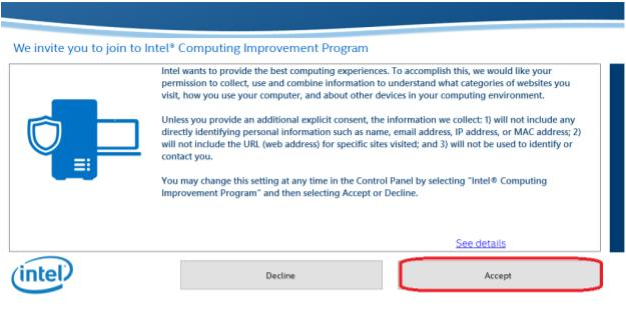
Alternatively, join the program via the Control Panel:
- Open the Control Panel (Windows Key + “R”, then type “control panel”, and click “OK”)

- Click View By and select Large Icons or Small Icons.

- Click the Intel® Computing Improvement Program label.

- If the Windows User Account Control window appears, allow application to make changes.
- In the Intel® Computing Improvement Program window, click Accept.
If I choose not to participate in the program now, can I join the program later?
Yes, if the Intel® Driver & Support Assistant software is installed, join the program via the system tray:
- Locate the system tray icons and expandable arrow menu in the bottom right of your desktop.
- Right click on the Intel® Driver & Support Assistant icon and select "Intel® Computing Improvement Program".
- Consent GUI or download prompt will be opened to join the program.
Alternatively, join the program via the Control Panel:
- Open the Control Panel (Windows Key + “R”, then type “control panel”, and click “OK”)
- Click View By and select Large Icons or Small Icons.
- Click the Intel® Computing Improvement Program label.
- If the Windows User Account Control window appears, allow application to make changes.
- In the Intel® Computing Improvement Program window, click Accept.
Collected Data
If I participate in the Intel® Computing Improvement Program, what data is collected and how is it used?
Intel wants to provide the best computing experiences. To accomplish this, we would like your permission to collect, use, and combine information to understand:
- The categories of websites you visit, but not the URL itself
- How you use your computer
- System information from your computer
- Other devices in your computing environment
Usage information contains:
- Software usage: for example, frequency and duration of application usage such as Intel® Driver & Support Assistant, but not the application content itself such as specific actions or keyboard input.
- Feature usage: for example, how much RAM you usually use or your laptop’s average battery life.
- Other devices in your computing environment
- The categories of websites you visit, but not the URL itself, Includes universal plug and play devices and devices that broadcast information to your computer on a local area network: for example, smart TV model and vendor information, and video streaming devices.
- The categories of websites you visit, but not the URL itself,
- The information collected includes categorized web browsing history that shows how long and how often you visited specific categories of sites (i.e. social media, personal finance, or news). All site visits are classified into one of 30 categories. We do not collect URLs, web pages titles, or user-specific content without explicit permission from you.
Collected system information contains, but is not limited to:
- Your device manufacturer
- CPU model
- Memory and display configuration
- OS version
- Software versions
- Region and language settings
- Regional location and time zone
If I participate in the program, is there any personal information in the data collected?
The information we collect:
- Will not include any directly identifying personal information such as name, email address, IP address, or MAC address
- Will not include the URL (web address) for specific sites visited
- Will not be used to identify or contact you
If these types of information are requested from you, you will first be prompted for additional consent.
The information we collect does include a randomly generated identifier that allows combining information from your system over time to better understand usage trends.
Intel r computing improvement program что это за программа
When you download and install the Intel® Computing Improvement Program, click Accept on the invitation to join.
Why should I participate?
Intel uses information about your computer’s performance to make product improvements that may benefit you in the future. For example, if the data shows that a driver is not performing as expected, Intel uses that information for future driver updates.
The collected information is used to help Intel:
- Understand how well our products perform over time
- Determine the usefulness of our products and features
- Detect issues and identify future product improvements
What if I don’t choose to participate?
System performance information is not collected or sent to Intel. As a result, performance information from your computer cannot be used to improve future products.
If I choose not to participate in the program now, can I join the program later?
Yes, if the Intel® Driver & Support Assistant software is installed, join the program via the system tray:
- Locate the system tray icons and expandable arrow menu in the bottom right of your desktop.
- Right click on the Intel® Driver & Support Assistant icon and select "Intel® Computing Improvement Program".
- Consent GUI or download prompt will be opened to join the program.
Alternatively, join the program via the Control Panel:
- Open the Control Panel (Windows Key + “R”, then type “control panel”, and click “OK”)
- Click View By and select Large Icons or Small Icons.
- Click the Intel® Computing Improvement Program label.
- If the Windows User Account Control window appears, allow application to make changes.
- In the Intel® Computing Improvement Program window, click Accept.
If I choose not to participate in the program now, can I join the program later?
Yes, if the Intel® Driver & Support Assistant software is installed, join the program via the system tray:
- Locate the system tray icons and expandable arrow menu in the bottom right of your desktop.
- Right click on the Intel® Driver & Support Assistant icon and select "Intel® Computing Improvement Program".
- Consent GUI or download prompt will be opened to join the program.
Alternatively, join the program via the Control Panel:
- Open the Control Panel (Windows Key + “R”, then type “control panel”, and click “OK”)
- Click View By and select Large Icons or Small Icons.
- Click the Intel® Computing Improvement Program label.
- If the Windows User Account Control window appears, allow application to make changes.
- In the Intel® Computing Improvement Program window, click Accept.
Collected Data
If I participate in the Intel® Computing Improvement Program, what data is collected and how is it used?
Intel wants to provide the best computing experiences. To accomplish this, we would like your permission to collect, use, and combine information to understand:
- The categories of websites you visit, but not the URL itself
- How you use your computer
- System information from your computer
- Other devices in your computing environment
Usage information contains:
- Software usage: for example, frequency and duration of application usage such as Intel® Driver & Support Assistant, but not the application content itself such as specific actions or keyboard input.
- Feature usage: for example, how much RAM you usually use or your laptop’s average battery life.
- Other devices in your computing environment
- The categories of websites you visit, but not the URL itself, Includes universal plug and play devices and devices that broadcast information to your computer on a local area network: for example, smart TV model and vendor information, and video streaming devices.
- The categories of websites you visit, but not the URL itself,
- The information collected includes categorized web browsing history that shows how long and how often you visited specific categories of sites (i.e. social media, personal finance, or news). All site visits are classified into one of 30 categories. We do not collect URLs, web pages titles, or user-specific content without explicit permission from you.
Collected system information contains, but is not limited to:
- Your device manufacturer
- CPU model
- Memory and display configuration
- OS version
- Software versions
- Region and language settings
- Regional location and time zone
If I participate in the program, is there any personal information in the data collected?
The information we collect:
- Will not include any directly identifying personal information such as name, email address, IP address, or MAC address
- Will not include the URL (web address) for specific sites visited
- Will not be used to identify or contact you
If these types of information are requested from you, you will first be prompted for additional consent.
The information we collect does include a randomly generated identifier that allows combining information from your system over time to better understand usage trends.