Введение в Data Vault
Большинство компаний сегодня накапливают различные данные, полученные в процессе работы. Часто данные приходят из различных источников — структурированные и не очень, иногда в режиме реального времени, а иногда они доступны в строго определенные периоды. Все это разнообразие нужно структурированно хранить, чтоб потом успешно анализировать, рисовать красивые отчеты и вовремя замечать аномалии. Для этих целей проектируется хранилище данных (Data Warehouse, DWH).
Существует несколько подходов к построению такого универсального хранилища, которые помогают архитектору избежать распространенных проблем, а самое главное обеспечить должный уровень гибкости и расширяемости DWH. Об одном из таких подходов я и хочу рассказать.
Кому будет интересна эта статья?
- Ищете более функциональную альтернативу схеме «звезды» и Третьей Нормальной Форме?
- У Вас уже есть хранилище данных, но его тяжело дорабатывать?
- Нужна хорошая поддержка историчности, а текущая архитектура для этого не подходит?
- Возникают проблемы при сборе данных из нескольких источников?
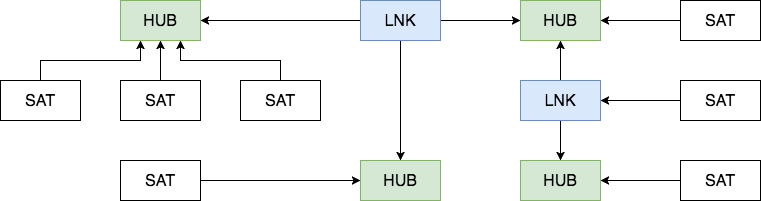
Data Vault состоит из трех основных компонентов — Хаб (Hub), Ссылка (Link) и Сателлит (Satellite).
Хаб — основное представление сущности (Клиент, Продукт, Заказ) с позиции бизнеса. Таблица-Хаб содержит одно или несколько полей, отражающих сущность в понятиях бизнеса. В совокупности эти поля называются «бизнес ключ». Идеальный кандидат на звание бизнес-ключа это ИНН организации или VIN номер автомобиля, а сгенерированный системой ID будет наихудшим вариантом. Бизнес ключ всегда должен быть уникальным и неизменным.
Хаб так же содержит мета-поля load timestamp и record source, в которых хранятся время первоначальной загрузки сущности в хранилище и ее источник (название системы, базы или файла, откуда данные были загружены). В качестве первичного ключа Хаба рекомендуется использовать MD5 или SHA-1 хеш от бизнес ключа.

Ссылка
Таблицы-Ссылки связывают несколько хабов связью многие-ко-многим. Она содержит те же метаданные, что и Хаб. Ссылка может быть связана с другой Ссылкой, но такой подход создает проблемы при загрузке, так что лучше выделить одну из Ссылок в отдельный Хаб.

Сателлит
Все описательные атрибуты Хаба или Ссылки (контекст) помещаются в таблицы-Сателлиты. Помимо контекста Сателлит содержит стандартный набор метаданных (load timestamp и record source) и один и только один ключ «родителя». В Сателлитах можно без проблем хранить историю изменения контекста, каждый раз добавляя новую запись при обновлении контекста в системе-источнике. Для упрощения процесса обновления большого сателлита в таблицу можно добавить поле hash diff: MD5 или SHA-1 хеш от всех его описательных атрибутов. Для Хаба или Ссылки может быть сколь угодно Сателлитов, обычно контекст разбивается по частоте обновления. Контекст из разных систем-источников принято класть в отдельные Сателлиты.

Как с этим работать?

* Картинка основана на иллюстрации из книги Building a Scalable Data Warehouse with Data Vault 2.0
Сначала данные из операционных систем поступают в staging area. Staging area используется как промежуточное звено в процессе загрузки данных. Одна из основных функций Staging зоны это уменьшение нагрузки на операционные базы при выполнении запросов. Таблицы здесь полностью повторяют исходную структуру, но любые ограничения на вставку данных, вроде not null или проверки целостности внешних ключей, должны быть выключены с целью оставить возможность вставить даже поврежденные или неполные данные (особенно это актуально для excel-таблиц и прочих файлов). Дополнительно в stage таблицах содержатся хеши бизнес ключей и информация о времени загрузки и источнике данных.
После этого данные разбиваются на Хабы, Ссылки и Сателлиты и загружаются в Raw Data Vault. В процессе загрузки они никак не агрегируются и не пересчитываются.
Business Vault — опциональная вспомогательная надстройка над Raw Data Vault. Строится по тем же принципам, но содержит переработанные данные: агрегированные результаты, сконвертированные валюты и прочее. Разделение чисто логическое, физически Business Vault находится в одной базе с Raw Data Vault и предназначен в основном для упрощения формирования витрин.
b_sat_order_total_price 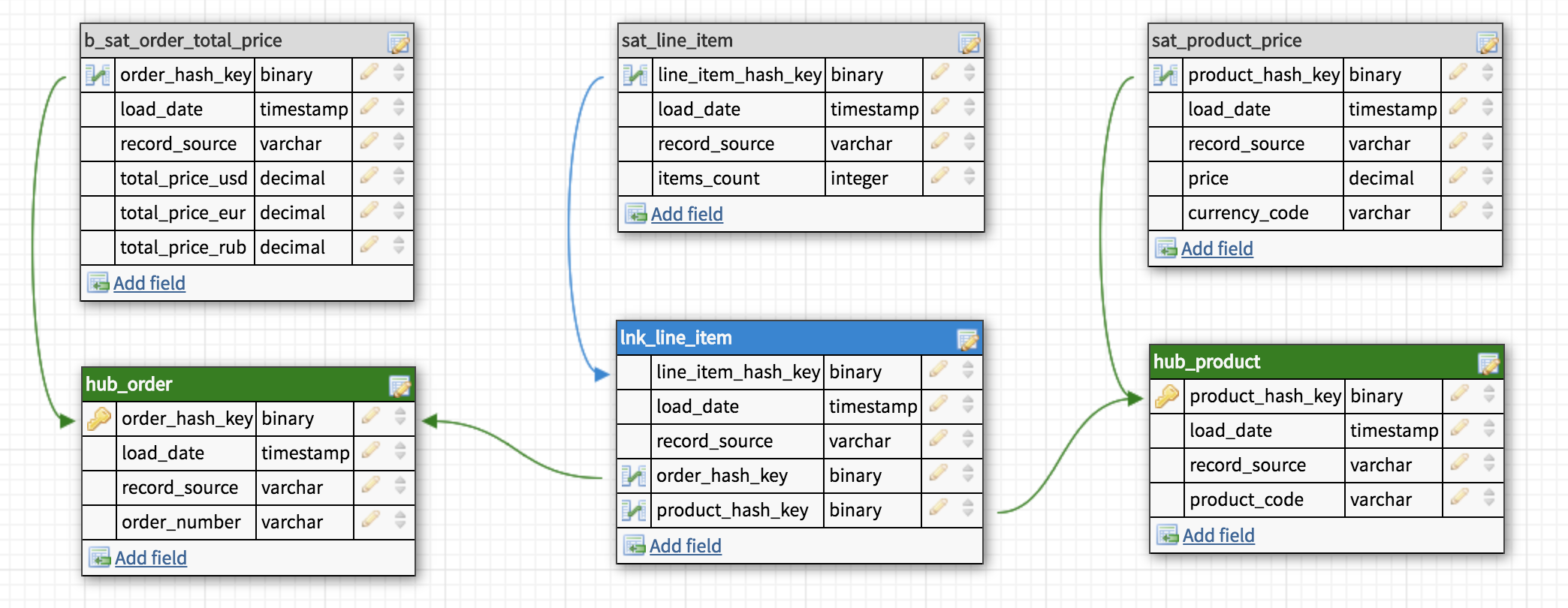
Когда нужные таблицы созданы и заполнены, наступает очередь витрин данных (Data Marts). Каждая витрина это отдельная база данных или схема, предназначенная для решения задач различных пользователей или отделов. В ней может быть специально собранная «звезда» или коллекция денормализованных таблиц. Если возможно, таблицы внутри витрин лучше делать виртуальными, то есть вычисляемыми «на лету». Для этого обычно используются SQL представления (SQL views).
Заполнение Data Vault
Здесь все довольно просто: сначала загружаются Хабы, потом Ссылки и затем Сателлиты. Хабы можно загружать параллельно, так же как и Сателлиты и Ссылки, если конечно не используется связь link-to-link.
Есть вариант и вовсе выключить проверку целостности и загружать все данные одновременно. Как раз такой подход соответствует одному из основных постулатов DV — «Загружать все доступные данные все время (Load all of the data, all of the time)» и именно здесь играют решающую роль бизнес ключи. Суть в том, что возможные проблемы при загрузке данных должны быть минимизированы, а одна из наиболее распространенных проблем это нарушение целостности. Подход, конечно, спорный, но лично я им пользуюсь и нахожу действительно удобным: данные все равно проверяются, но после загрузки. Часто можно столкнуться с проблемой отсутствия записей в нескольких Хабах при загрузке Ссылок и последовательно разбираться, почему тот или иной Хаб не заполнен до конца, перезапуская процесс и изучая новую ошибку. Альтернативный вариант — вывести недостающие данные уже после загрузки и увидеть все проблемы за один раз. Бонусом получаем устойчивость к ошибкам и возможность не следить за порядком загрузки таблиц.
Преимущества и недостатки
[+] Гибкость и расширяемость.
С Data Vault перестает быть проблемой как расширение структуры хранилища, так и добавление и сопоставление данных из новых источников. Максимально полное хранилище «сырых» данных и удобная структура их хранения позволяют нам сформировать витрину под любые требования бизнеса, а существующие решения на рынке СУБД хорошо справляются с огромными объемами информации и быстро выполняют даже очень сложные запросы, что дает возможность виртуализировать большинство витрин.
[+] Agile-подход из коробки.
Моделировать хранилище по методологии Data Vault довольно просто. Новые данные просто «подключаются» к существующей модели, не ломая и не модифицируя существующую структуру. При этом мы будем решать поставленную задачу максимально изолированно, загружая только необходимый минимум, и, вероятно, наша временнáя оценка для такой задачи станет точнее. Планирование спринтов будет проще, а результаты предсказуемы с первой же итерации.
[–] Обилие JOIN’ов
За счет большого количества операций join запросы могут быть медленнее, чем в традиционных хранилищах данных, где таблицы денормализованы.
[–] Сложность.
В описанной выше методологии есть множество важных деталей, разобраться в которых вряд ли получится за пару часов. К этому можно прибавить малое количество информации в интернете и почти полное отсутствие материалов на русском языке (надеюсь это исправить). Как следствие, при внедрении Data Vault возникают проблемы с обучением команды, появляется много вопросов относительно нюансов конкретного бизнеса. К счастью, существуют ресурсы, на которых можно задать эти вопросы. Большой недостаток сложности это обязательное требование к наличию витрин данных, так как сам по себе Data Vault плохо подходит для прямых запросов.
[–] Избыточность.
Довольно спорный недостаток, но я часто вижу вопросы об избыточности, поэтому прокомментирую этот момент со своей точки зрения.
Многим не нравится идея создания прослойки перед витринами данных, особенно если учесть, что таблиц в этой прослойке примерно в 3 раза больше, чем могло бы быть в третьей нормальной форме, а значит в 3 раза больше ETL-процессов. Это так, но и сами ETL процессы будут значительно проще за счет своего однообразия, а все объекты в хранилище достаточно просты для понимания.
Кажущаяся избыточной архитектура построена для решения вполне конкретных задач, и конечно не является серебряной пулей. В любом случае я бы не рекомендовал что-то менять до того момента, пока описанные выше преимущества Data Vault не станут востребованы.
Data vault что это
Данная методология содержит правила, стандарты, а также драйверы, с помощью которых осуществляется управление проектом. Она описывает модели загрузки данных, стандартные домены атрибутов, системные поля и компоненты по учету времени, необходимые для того, чтобы архитектура Data Vault отражала надлежащие потребности бизнеса. Эта методика также говорит о том, что бизнес-правила можно разделить на две составляющие: жесткие и мягкие правила.
Мягкие правила бизнеса состоят из инструкций, которые меняют содержание данных, контекст или детализацию данных. Информация, в соответствии с мягкими правилами, обрабатывается на пути из хранилища данных (в витрины данных, в отчеты).
Считается, что жесткие правила бизнеса включают в себя нормализацию, значения по умолчанию (замена NULL-значений) и согласование типов данных. Жесткие правила выполняются на пути в модель Data Vault или, иногда, на пути к области подготовки данных.
Методология вобрала в себя лучшие свойства концепций Six Sigma, TQM, SEI/CMMI Level 5 и PMP. Она максимально приближает усилия, приложенные на проектирование хранилища данных, к результатам, которые ожидаются при применении оптимизации бизнес-процессов.
Применение методики опытными сотрудниками позволяет сделать процесс построения ХД относительно простым, последовательным и измеримым по времени.
Agile-процесс по построению модели Data Vault включает в себя следующие шаги:
а) Выбрать вид отчетности для последующего его создания
б) Определить исходные информационные системы, таблицы-источники
в) Спроектировать ER-модель Data Vault
г) Добавить атрибуты к существующей ER-модели
д) Создать ETL-процедуры загрузки данных в Data Vault
е) Спроектировать модель витрины данных для отчетности
ж) Загрузить данные в витрины путем создания ETL-процедур или SQL-скриптов
з) Построить отчеты на основе витрин данных
и) Протестировать корректность данных в отчетах
Архитектура Data Vault
Система Data Vault основана на трёхъярусной архитектуре. Исходное корпоративное хранилище данных отделяется от бизнес-пользователей и используемых ими слоев данных (например, схем «звезда»). Эта изоляция дополнительно снижает затраты и накладные расходы, связанные с изменениями, которые происходят на уровне бизнеса.
Тремя ярусами в данной архитектуре являются:
- Область подготовки данных (только для пакетов исходных данных);
- Корпоративное хранилище Data Vault;
- Витрины данных (рис. 5).

Рис. 5. Общий вид архитектуры Data Vault
В настоящих обрабатывающих системах реального времени ХД на основе Data Vault становится абонентом и инициатором ESB (Enterprise Service Bus, Сервисная Шина Предприятия). Сообщения в режиме реального времени не останавливаются в области подготовки данных, а направляются в ХД напрямую.
Путем разделения представительского слоя от слоя хранения всех корпоративных данных можно достичь согласованности в наборах результатов, а также внедрить, так называемый, self-service BI. Такое «разъединение» слоев дает возможность построить виртуальный слой витрин данных поверх ХД. Бизнес-пользователи получают право напрямую управлять этим виртуальным слоем и изменять его. Отсюда и термин: self-service BI.
Архитектура модели играет ключевую роль в разделении обязанностей, позволяя каждому компоненту быть масштабируемым надлежащим образом для того, чтобы удовлетворять постоянно меняющиеся потребности бизнеса. Обычно, говоря о масштабе, на ум приходят термины BIG DATA и NoSQL. За счет внедрения стандартов и спецификаций Data Vault 2.0 можно легко согласовать неструктурированные и полуструктурированные данные непосредственно в ХД.
Data Vault 2.0 Modeling Basics
In my last post, we looked at the need for an Agile Data Engineering solution, issues with some of the current data warehouse modeling approaches, the history of data modeling in general, and Data Vault specifically. This time we get into the technical details of what the Data Vault Model looks like and how you build one.
For my examples I will be using a simply Human Resources (HR) type model that most people should relate to (even if you have never worked with an HR model). In this post I will walk through how you get from the OLTP model to the Data Vault model.
Data Vault Prime Directive
One thing to get very clear up front is that, unlike many data warehouse implementations today, the Data Vault Method requires that we load data exactly as it exists in the source system. No edits, no changes, no application of soft business rules (including data cleansing).
So that the Data Vault is 100% auditable.
If you alter the data on the way into the Data Vault, you break the ability to trace the data to the source in case of an audit because you cannot match the data warehouse data to source data. Remember your EDW (Enterprise Data Warehouse) is the enterprise store of historical data too. Once the data is purged from the source systems, your EDW may also be your Source of Record. So it is critical the data remain clean.
We have a saying in Data Vault world – The DV is a source of FACTS, not a source of TRUTH (truth is often subjective & relative in the data world).
Now, you can alter the data downstream from the Data Vault when you build your Information Marts. I will discuss that in more detail in the 3 rd and 4 th articles.
For a Data Vault, the first thing you do is model the Hubs. Hubs are the core of any DV design. If done properly, Hubs are what allow you to integrate multiple source systems in your data warehouse. To do that, they must be source system agnostic. That means they must be based on true Business Keys (or meaningful natural keys) that are not tied to any one source system.
That means you should not use source system surrogate keys for identification. Hubs keys must be based on an identifiable business element or elements.
What is an identifiable business element? It is a column (or set of columns) found in the systems that the business consistently uses to identify and locate the data. Regardless of source system, these elements must have the same semantic meaning (even though the names may vary from source to source). If you are very lucky, the source system model will have this defined for you in the form of alternate unique keys or indexes. If not you will need to engage in data profiling and conversations with the business customers to figure out what the business keys are.
This is the most important aspect of Data Vault modeling. You must get this right if you intend to build an integrated enterprise data warehouse for your organization.
(To be honest, in order to really, really do this right, you should start by building a conceptual model based on business processes using business terminology. If you do that, the Data Vault model will be most obvious to you and it will not be based on any existing source system).
As an example, look at these tables from a typical HR application. This is the source OLTP example we will work with.
Figure 1 – Source Model
The Primary Key (PK) on the LOCATION table is LOCATION_ID . But that is an integer surrogate key. It is not a good candidate for the Business Key.
Why? Because every source system can have an ID of 1, 2, 201, 5389, etc. It is just a number and has no meaning in the real world. Instead LOCATION_NAME is the likely candidate for the Business Key (BK). Looking in the database, we see that it has a unique index. Great! (If there were no unique indexes, we would have to talk to the business and/or query the data directly to find a unique set of columns to use.)
For the COUNTRIES table, the COUNTRY_ABBREV column will work as a Business Key, and for REGIONS , it would be the REGION_NAME .
Fundamentally, a Hub is a list of unique business keys.
A Hub table has a very simple structure. It contains:
- A Hub PK
- The Business Key column(s)
- The Load Date (LOAD_DTS)
- The Source for the record (REC_SRC)
New in DV 2.0, the Hub PK is a calculated field consisting of a Hash (often MD5) of the Business Key columns (more on that in a bit).
The Business Key must be a declared unique or alternate key constraint in the Hub. That means for each key there will be only on row in the Hub table, ever. It can be a compound key made up of more than one column.
The LOAD_DTS tells us the first time the data warehouse “knew” about that business key. So no matter how many loads you run, this row is created the first time and never dropped or updated.
The REC_SRC tells us which source system the row came from. If the value can come from multiple sources, this will tell us which source fed us the value first.
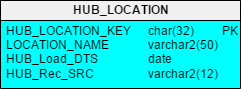
Figure 2 – Simple Hub Table
In the HUB_LOCATION table, LOCATION_NAME is the Business Key. It is a unique name used in the source systems to identify a location. It must have a unique constraint or index declared on it in the database to prevent duplicates from being entered and to facilitate faster query access.
What can you do with a single Hub table?
You can do data profiling and basic analysis on the business key. Answer questions like:
- How many locations do we have?
- How many source systems provide us locations names?
- Are there data quality issues? Do we see Location Names that seem similar but are from different sources? (Hint: if you do, you may have a master data management issue)
Hash-based Primary Keys
One of the innovations in DV 2.0 was the replacement of the standard integer surrogate keys with hash-based primary keys. This was to allow a DV solution to be deployed, at least in part, on a Hadoop solution. Hadoop systems do not have surrogate key generators like a modern RDBMS, but you can generate an MD5 Hash. With a Hash Key in Hadoop and one in your RDBMS, you can “logically” join this data (with the right tools of course). (Plus sequence generators and counters can become a bottleneck on some systems at very high volumes and degrees of parallelism.)
Here is an example of Oracle code to create the HUB_LOCATION_KEY:
For a Hub and source Stage tables, we apply an MD5 (or other) hash calculation to the Business Key columns. So if you have so much data coming so fast that you cannot load it quickly into your database, one option is to build stage tables (really copies of source tables) on Hadoop so you do not lose the data. As you load those files, the hash calculation is applied to the Business Key and added as a new piece of data during the load. Then when it is time to load to your database you can compare the Hash Key on Hadoop to the Hash Key in your Hub table to see if the data is loaded already or not. (Note: how to load a data vault is too much for a blog post; please look at the new Data Vault book or the online training class for details).
Links
The Link is the key to flexibility and scalability in the Data Vault modeling technique. They are modeled in such a way as to allow for changes and additions to the model over time by providing the ability to easily add new objects and relationships without having to change existing structures or load routines.
In a Data Vault model, all source data relationships (i.e., foreign keys) and events are represented as Links. One of the foundational rules in DV is that Hubs can have no FKs, so to represent the joins between Hub concepts, we must use a Link table. The purpose of the Link is to capture and record the relationship of data elements at the lowest possible grain. Other examples of Links include transactions and hierarchies (because in reality those are the intersection of a bunch of Hubs too).
A Link is therefore an intersection of business keys. It contains the columns that represent the business keys from the related Hubs. A Link must have more than one parent table. There must be at least two Hubs, but, as in the case of a transaction, they may be composed of many Hubs. A Link table’s grain is defined by the number of parent keys it contains (very similar to a Fact table in dimensional modeling).
Like a Hub, the Link is also technically a simple structure. It contains:
- A Link PK (Hash Key)
- The PKs from the parent Hubs – used for lookups
- The Business Key column(s) – new feature in DV 2.0
- The Load Date (LOAD_DTS)
- The Source for the record (REC_SRC)
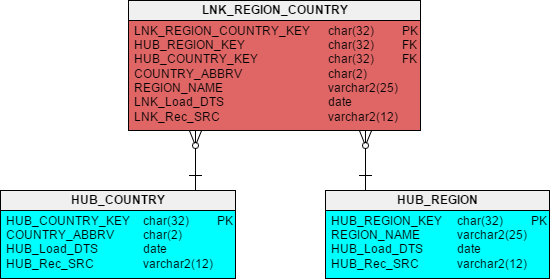
Figure 3 – Link and Parent Hubs
In Figure 3 you see the results of converting the FK to REGIONS from the COUNTRIES table (Figure 1) into a Link table. The PK column LNK_REGION_COUNTRY_KEY is a hash key calculated against the Business Key columns from the contributing Hubs. This gives us a unique key for every combination of Country and Region that may be fed to us by the source systems.
In Oracle that might look like:
Just as in the Hubs, the Link records only the first time that the relationship appears in the DV.
In addition, the Link contains the PKs from the parent Hubs (which should be declared as an alternate unique key or index). This makes up the natural key for the Link.
New to DV 2.0 is the inclusion of the text business key columns from the parent Hubs. Yes, this is a specific de-normalization.
Why? For query performance when you want to extract data from the Data Vault (more on this in part 3 & 4 of this series). Depending on your platform, you may consider adding a unique key constraint or index on these columns as well.
Why are Links Many-to-Many?
Links are intersection tables and so, by design, they represent a many-to-many relationship. Since a FK is usually 1:M, you may ask why it is done this way.
One word: Flexibility!
Remember that part of the goal of the Data Vault is to store only the facts and avoid reengineering (refactoring) even if the business rules or source systems change. So if you did your business modeling right, the only thing that might change would be the cardinality of a relationship. Now granted it is not likely that one Region will ever be in two Countries, but if that rule changed or you get a new source system that allows it, the 1:M might become a M:M. With a Link, we can handle either with no change to the design or the load process!
That is dynamic adaptability. That is an agile design. (Maximize the amount of work not done.)
Using this type of design pattern allows us to more quickly adapt and absorb business rule and source system changes while minimizing the need to re-engineer the Data Vault. Less work. Less time. No re-testing. Less money!

Satellites
Satellites (or Sats for short) are where all the big action is in a Data Vault. These structures are where all the descriptive (i.e., non-key) columns go, plus this is where the Change Data Capture (CDC) is done and history is stored. The structure and concept are very much like a Type 2 Slowly Changing Dimension.
To accomplish this function, the Primary Key for a Sat contains two parts: the PK from its Parent Hub (or Link) plus the LOAD_DTS. So every time we load the DV and find new records or changed records, we insert those records into the Sats and give them a timestamp. (On a side note, this structure also means that a DV is real-time-ready in that you can load whenever and as often as you need as long as you set the LOAD_DTS correctly.)
This is the only structure in the core Data Vault that has a two-part key. That is as complicated as it gets from a structure perspective.
Of course, a Sat must also have the REC_SRC column for auditability. REC_SRC will tell us the source of each row of data in the Sat.
Important Note: The REC_SRC in a Sat does NOT have to be the same as that in the parent Hub or Link. Remember that Hubs and Links record the source of the concept key or relationship the first time the DV sees it. Subsequent loads may find different sources provide different descriptive information at different times for one single Hub record (don’t forget that we are integrating systems too).
You may have noticed that not all the columns in Figure 1 ended up in the Hubs or the Link tables that we have looked at.
Where do they go? They go in the Sats.
Figure 4 – Hubs and Links with Sats
In Figure 4, look at SAT_LOCATIONS . There you see all the address columns from the original table LOCATIONS (Figure 1). Likewise in SAT_COUNTRIES you see COUNTRY_NAME and in SAT_REGIONS you see REGION_ID (remember that was the source system PK but NOT the Business Key, so it goes here so we can trace back to the source if needed).
Use of HASH_DIFF columns for Change Data Capture (CDC)
Another innovation that came with DV 2.0 is the use of a Hash-based column for determining if a record in the source has changed from what was previously loaded into the Data Vault. We call that a Hash Diff (for difference). Every Sat must have this column to be DV 2.0 compliant.
So, how this works is that you first calculate a Hash on the combination of all of the descriptive (non-meta data) columns in the Sat.
Examples for Oracle for the three Sats in Figure 4 are:
Now when you get ready to do another load, you must calculate a Hash on the inbound values (using exactly the same formula) and then compare that to the HASH_DIFF column in the Sat for the most recent row (i.e., from the last load date) for the same Hub Business Key. If the Hash calculation is different, then you create a new row. If not, you do nothing (which is way faster).
This is exactly what you do when you build a Type 2 SCD (Slowly Changing Dimension).
The difference is that instead of comparing every single column in the feed to every single column in the Sat, you only have to compare one column – the HASH_DIFF . (See my white paper to learn on how we did it in DV 1.0)
So which do you think is faster on a very wide table?
Comparing one column vs. 50 columns (or several hundred columns)?
In fact, since all the HASH_DIFFs are the same size, the speed of the comparison allows you to scale to wider tables without the CDC process slowing your down.
Is it overkill for a small, narrow table? Probably.
But if you want a standards based, repeatable approach, you apply the same rules regardless. Plus if you follow the patterns, you can automate the generation of the design and load processes (or buy software that does it for you).
Another Note: There are no updates! We never over write data in a Data Vault! We only insert new data. That allows us to keep a clean audit trail.
Conclusion
So there you have the basics (and then some) of what makes up a raw Data Vault Data Model and you have seen some of the innovations from Data Vault 2.0
Just remember this list:
- Hubs = Business Keys
- Links = Associations / Transactions
- Satellites = Descriptors
Hubs make it business driven and allow for integration across systems.
Links give you the flexibility to absorb structural and business rule changes without re-engineering (and therefore without reloading any data).
Sats give you the adaptability to record history at any interval you want plus unquestionable auditability and traceability to your source systems.
All together you get agility, flexibility, adaptability, auditability, scalability, and speed to market.
What more could a data warehouse architect want?
Want more in-depth details? Check out LearnDataVault.com
Until next time!
 Kent Graziano is a recognized industry expert, leader, trainer, and published author in the areas of data modeling, data warehousing, data architecture, and various Oracle tools (like Oracle Designer and Oracle SQL Developer Data Modeler). A certified Data Vault Master, Data Vault 2.0 Practitioner (CDVP2), and an Oracle ACE Director with over 30 years experience in the Information Technology business. Nowadays Kent is independent consultant (Data Warrior LLC) working out of The Woodlands, Texas.
Want to know more about Kent Graziano?
Go to his: blog, Twitter profile, LinkedIn profile.