How to merge multiple CSV files with Python
In this guide, I’ll show you several ways to merge/combine multiple CSV files into a single one by using Python (it’ll work as well for text and other files). There will be bonus — how to merge multiple CSV files with one liner for Linux and Windows. Finally with a few lines of code you will be able to combine hundreds of files with full control of loaded data — you can convert all the CSV files into a Pandas DataFrame and then mark each row from which CSV file is coming.
- data_201901.csv
- data_201902.csv
- data_201903.csv
Steps to merge multiple CSV(identical) files with Python
Note: that we assume — all files have the same number of columns and identical information inside
Short code example — concatenating all CSV files in Downloads folder:
Step 1: Import modules and set the working directory
First we will start with loading the required modules for the program and selecting working folder:
Step 2: Match CSV files by pattern
Next step is to collect all files needed to be combined. This will be done by:
The next code: data_*.csv match only files:
- starting with data_
- with file extension .csv
You can customize the selection for your needs having in mind that regex matching is used.
Step 3: Combine all files in the list and export as CSV
The final step is to load all selected files into a single DataFrame and converted it back to csv if needed:
Note that you may change the separator by: sep=’,’ or change the headers and rows which to be loaded
You can find more about converting DataFrame to CSV file here: pandas.DataFrame.to_csv
Full Code
Below you can find the full code which can be used for merging multiple CSV files.
Steps to merge multiple CSV(identical) files with Python with trace
Now let’s say that you want to merge multiple CSV files into a single DataFrame but also to have a column which represents from which file the row is coming. Something like:
| row | col | col2 | file |
|---|---|---|---|
| 1 | A | B | data_201901.csv |
| 2 | C | D | data_201902.csv |
This can be achieved very easy by small change of the code above:
In this example we iterate over all selected files, then we extract the files names and create a column which contains this name.
Combine multiple CSV files when the columns are different
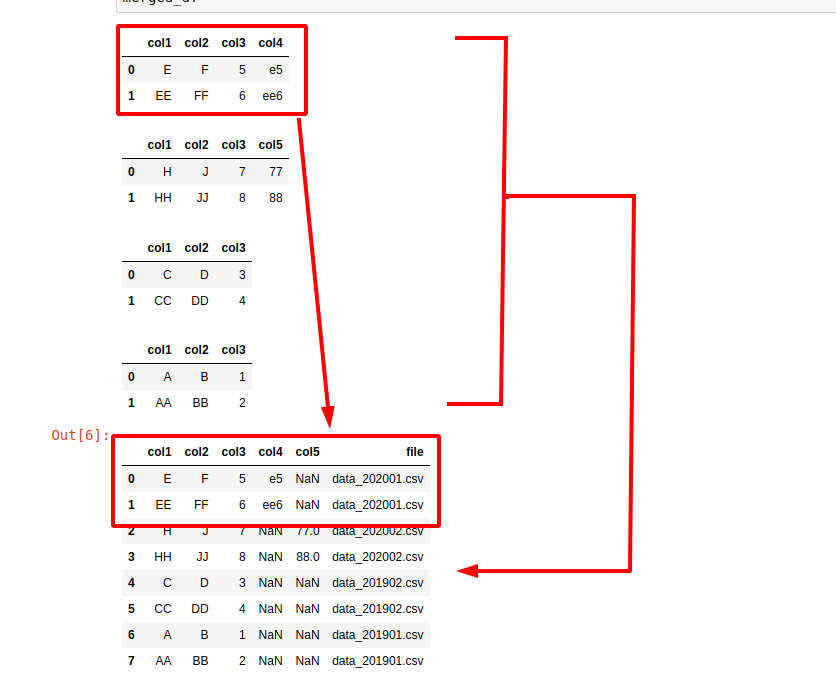
Sometimes the CSV files will differ for some columns or they might be the same only in the wrong order to be wrong. In this example you can find how to combine CSV files without identical structure:
Pandas will align the data by this method: pd.concat . In case of a missing column the rows for a given CSV file will contain NaN values:
| row | col | col2 | col_201901 | file |
|---|---|---|---|---|
| 1 | A | B | AA | data_201901.csv |
| 2 | C | D | NaN | data_201902.csv |
If you need to compare two csv files for differences with Python and Pandas you can check: Python Pandas Compare Two CSV files based on a Column
More about pandas concat: pandas.concat
Bonus: Merge multiple files with Windows/Linux
Linux
Sometimes it’s enough to use the tools coming natively from your OS or in case of huge files. Using python to concatenate multiple huge files might be challenging. In this case for Linux it can be used:
In this case we are working in the current folder by matching all files starting with data_ . This is important because if you try to execute something like:
You will try to merge the newly output file as well which may cause issues. Another important note is that this will skip the first lines or headers of each file. In order to include headers you can do:
If the commands above are not working for you then you can try with the next two. The first one will merge all csv files but have problems if the files ends without new line:
The second one will merge the files and will add new line at the end of them:
Слияние двух CSV-файлов с использованием Python
Хорошо, я прочитал несколько тем здесь о переполнении стека. Я думал, что это будет довольно легко сделать, но я все еще не очень хорошо понимаю Python. Я попробовал пример, расположенный по адресу Как объединить 2 CSV-файла с общим значением столбца, но оба файла имеют разное количество строк , и это было полезно, но у меня все еще нет результатов, которых я надеялся достичь.
По сути, у меня есть 2 CSV-файла с общим первым столбцом. Я хотел бы объединить 2. Т.е..
output.csv (не тот, который я получаю, а то, что я хочу)
output.csv (вывод, который я на самом деле получил)
Код, который я пробовал:
Любая помощь очень ценится.
2 ответа
Когда я работаю с файлами csv , я часто использую библиотека панд . Это делает такие вещи очень легкими. Например:
Ниже приведены некоторые пояснения. Сначала мы читаем в CSV-файлах:
и мы видим, что есть дополнительный столбец данных (обратите внимание, что первая строка fileb.csv — title,mar,apr,may,jun, — в конце добавляется запятая). Мы можем избавиться от этого достаточно легко:
Теперь мы можем объединить a и b в заголовке столбца:
и, наконец, запиши это:
Вам нужно хранить все дополнительные строки в файлах в вашем словаре, а не только одну из них:
Затем, поскольку значения в словарях являются списками, вам нужно просто объединить списки вместе:
Как объединить файлы CSV с разной структурой в один с помощью Python 3.7?
У меня есть 300 разных файлов CSV в моем каталоге проекта Python, все с разной структурой, то есть с разными столбцами, и я хочу объединить все эти файлы в один консолидированный файл CSV.
Приведу пример из двух файлов:
Сводный CSV-файл должен иметь следующую структуру:
У меня есть полный список из 300 различных столбцов (все известные) и 300 результирующих файлов CSV. Тикеры заранее не известны. Как видно из приведенного выше примера, доступные тикеры в каждом файле могут различаться, т.е. если тикер не указан в одном файле, он должен автоматически получить 0 для соответствующей точки данных, например. выручка в сводном файле.
Я искал stackoverflow, но не нашел ответа на этот конкретный вопрос. Спасибо за вашу помощь и идеи о том, как решить эту проблему.
У всех файлов есть общий столбец? это будет «тикер»? Зная общий столбец, будет намного проще.
Неважно, я придумал способ найти общие столбцы при чтении файлов. Я обновлю свой ответ. Сообщите мне, если это сработает.