SQL ALTER TABLE
Команда ALTER TABLE используется для добавления, удаления или модификации колонки в уже существующей таблице.
Команда ALTER TABLE
Команда ALTER TABLE изменяет определение таблицы одним из следующих способов:
- добавляет столбец
- добавляет ограничение целостности
- переопределяет столбец (тип данных, размер, умалчиваемое значение)
- удаляет столбец
- модифицирует характеристики памяти или иные параметры
- включает, выключает или удаляет ограничение целостности или триггер.
Условие: Таблица должна быть в схеме пользователя, или пользователь должен иметь системную привилегию ALTER ANY TABLE. Добавляя столбец с ограничением NOT NULL, разработчик или администратор БД должны учесть ряд обстоятельств. Сначала нужно создать столбец без ограничения, а затем ввести значения во все его строки. После того как все значения столбца станут не NULL-значениями, к нему можно применить ограничение NOT NULL. Если столбец с ограничением NOT NULL пытается добавить пользователь, возвращается сообщение об ошибке, говорящее о том, что либо таблица должна быть пустой, либо в столбце должны содержаться значения для каждой существующей строки (напомним, что после наложения на столбец ограничения NOT NULL в нем не могут присутствовать NULL-значения ни в одной из существующих строк). В СУБД Oracle, начиная с версии 8i, можно удалять столбцы. Изменяя типы данных существующих столбцов или добавляя столбцы в таблицу базы данных, нужно соблюдать ряд условий. Общепринято, что увеличение – это хорошо, а уменьшение, как правило, — не очень. Допустимые увеличения:
- Увеличение размера столбца CHAR или VARCHAR2
- Увеличение размера столбца NUMBER
- Добавление новых столбцов в таблицу
Уменьшение различных характеристик таблицы, в том числе некоторых типов данных столбцов и реального числа столбцов таблицы, требует особых действий. Часто перед внесением изменения нужно убедиться в том, что в соответствующем столбце или столбцах все значения являются NULL-значениями. Для выполнения подобных операций над столбцами таблицы, содержащими данные, разработчик должен найти или создать какую-то область для временного хранения этих данных. Например, создать таблицу с помощью команды CREATE TABLE AS SELECT, в которой извлекаются данные из первичного ключа и изменяемого столбца или столбцов. Допустимые изменения:
- Уменьшение размера столбца NUMBER (только при пустом столбце для всех строк)
- Уменьшение размера столбца CHAR или VARCHAR2 (только при пустом столбце для всех строк)
- Изменение типа данных столбца (только при пустом столбце для всех строк)
ALTER TABLE Пример 1
Добавление столбца в таблицу:
ALTER TABLE Пример 2
Изменение размера столбца таблицы:
ALTER TABLE Пример 3
Удаление столбца таблицы:
С помощью команды ALTER TABLE можно изменить имя таблицы без реального переноса физической информации в БД:
Аналогичную операцию можно выполнить с помощью команды RENAME:
Ограничения целостности столбцов и таблиц БД можно изменять, а также запрещать, разрешать и удалять. Это дает разработчику возможность создавать, модифицировать и удалять бизнес-правила, ограничивающие данные. Рассмотрим добавление ограничений в БД. Простота или сложность этого процесса зависит от определенных обстоятельств. Если вместе с БД создать ограничение нельзя, проще всего добавить его перед вводом данных:
ALTER TABLE Пример 4
Модификация структуры таблицы
В первой из приведенных выше команд для добавления ограничения NOT NULL для столбца используется конструкция MODIFY, а для добавления всех табличных ограничений целостности других типов – конструкция ADD. Столбец, для которого добавляется ограничение, должен уже существовать в таблице БД; в противном случае создать ограничение не удастся.
ALTER TABLE Пример 5
Для добавления ограничений целостности можно не указывать имя создаваемого ограничения с помощью ключевого слова CONSTRAINT. В этом случае команда будет выглядеть следующим образом:
Существует ряд условий создания ограничений:
- Первичные ключи: в столбцах не могут содержаться NULL-значения, и все значения должны быть уникальны.
- Внешние ключи: в тех столбцах других таблиц, на которые производятся ссылки, должны содержаться значения, соответствующие всем значениям ссылающихся столбцов, либо значения этих последних должны быть NULL-значениями.
- Ограничения UNIQUE: все значения столбцов должны быть уникальными или NULL-значениями.
- Ограничения CHECK: новое ограничение будет применяться только по отношению к данным, добавляемым или модифицируемым после его создания.
- NOT NULL: NULL-значения в столбцах запрещены.
Ограничения можно разрешать и запрещать. Разрешенное ограничение выполняет свои функции, реализуя бизнес-правила по отношению к вводимым в таблицу данным, а запрещенное ограничение переводится в разряд недействующих, как если бы оно было удалено, и его правила не реализуются.
ALTER TABLE Пример 6
ALTER TABLE Пример 7
В некоторых случаях запрещение первичного ключа, от которого зависят внешние ключи, может вызвать определенные сложности, например:
Для удаления первичного ключа при наличии зависящих от него внешних ключей в команде ALTER TABLE DISABLE <ограничения> обязательна конструкция CASCADE:
ALTER TABLE Пример 8
Запрещенное ограничение разрешается следующим образом:
Разрешить можно только те ограничения, которые были установлены ранее, а в данный момент запрещены. Ограничение, процесс создания которого завершился неудачей, не будет существовать в запрещенном виде, ожидая своего разрешения после устранения ошибки. Как правило, владелец таблицы или тот, кому предоставлены соответствующие права, может удалить ограничение:
Oracle ALTER TABLE ADD Column By Examples
Summary: in this tutorial, you will learn how to use the Oracle ALTER TABLE ADD column statement to add one or more columns to a table.
To add a new column to a table, you use the ALTER TABLE statement as follows:
In this statement:
- First, you specify the name of the table, which you want to add the new column, after the ALTER TABLE clause.
- Second, you specify the column name, data type, and its constraint.
Note that you cannot add a column that already exists in the table; trying to do so will cause an error. In addition, the ALTER TABLE ADD column statement adds the new column at the end of the table. Oracle provides no direct way to allow you to specify the position of the new column like other database systems such as MySQL.
In case you want to add more than one column, you use the following syntax:
In this syntax, you separate two columns by a comma.
Oracle ALTER TABLE ADD column examples
Let’s create a table named members for the demonstration.
The following statement adds a new column named birth_date to the members table:
In this example, the birth_date column is a DATE column and it does not accept null.
Suppose, you want to record the time at which a row is created and updated. To do so, you need to add two columns created_at and updated_at as follows:
The data types of the created_at and updated_at columns are TIMESTAMP WITH TIME ZONE . These columns also do not accept null.
To check whether a column exists in a table, you query the data from the user_tab_cols view. For example, the following statement checks whether the members table has the first_name column.
This query comes in handy when you want to check whether a column exists in a table before adding it.
For example, the following PL/SQL block checks whether the members table has effective_date column before adding it.
If you execute the block at the first time, the effective_date column is appended at the end of the members table. However, once you execute it from the second time, you will see the following message:
which is what we expected.
In this tutorial, you have learned how to use the Oracle ALTER TABLE ADD column statement to add one or more column to an existing table.
Oracle Alter Table
By  Priya Pedamkar

Introduction to Oracle Alter Table
In this article, we are going to discuss the Alter table command. This ALTER TABLE statement is used to modify a column, add a column, rename a column, rename a table or delete a column from the table. ALTER TABLE statement comes under DDL (Data Definition Language) queries because it is used to define the structure of the database or make changes to that structure. Hence the knowledge of ALTER TABLE statement is very much required to be a SQL developer. In this article, we are going to discuss in detail with examples. In this topic, we are going to learn about Oracle Alter Table.
Syntax
Hadoop, Data Science, Statistics & others
The syntax of the ALTER TABLE is given below.
ALTER TABLE table_name
Action column_name;
Parameters
- table_name: The name of the table on which we want to apply.
- Action: It represents whether we want to ADD, MODIFY, DROP or RENAME
- column_name: The name of the column on which we want to apply the action.
Examples of Oracle Alter Table
We are now going to discuss the different operations on which we can use the ALTER TABLE statement with examples.
1. Add a Column Using Alter Table Statement
ALTER TABLE statement can be used to add a new column in the existing table. This will be a DDL query since we are using it to change the structure of a table. We are going to use an example for this, In our case, we will add a new column to an existing table employee. The column will be named as PHONE_NUM and it will have a data type as NUMBER with a maximum size of 10. Let us look at the query for the same.
Code:
ALTER TABLE EMPLOYEE
ADD PHONE_NUM NUMBER(10);
Now we will run this query in the SQL Developer and check its output. The below screenshot shows us the output in SQL Developer after executing the query.
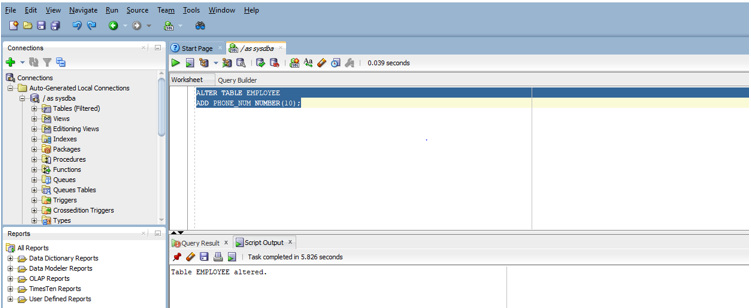
As you can see the output “Table Employee altered”. So, we now have an extra column with NULL values.
2. Adding Multiple Columns Using Alter Tables
In this case, we will have to add commas after every column so that Oracle is able to distinguish between two columns. In this example, we are going to add two columns in the orders table. The columns are CUSTOMER_NAME and PAYMENT. Both the columns will have data types as VARCHAR2 with size (20). Let us prepare the query for this case.
Code:
ALTER TABLE orders
ADD (CUSTOMER_NAME varchar2(20),
PAYMENT varchar2(20));
Let us run the query in SQL Developer. The below screenshot shows the output after the execution of the query in the tool.
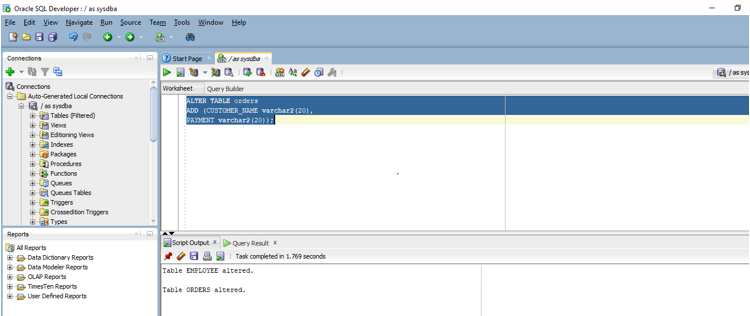
As you can see our query successfully altered the table ORDERS.
3. Modify Columns Using Alter Table Statement
Just as we can add columns we can also modify existing columns present in a table. It will also be a DDL query since we are modifying the structure of a table. In this, we will change the size of the data type of the column CUSTOMER_NAME of the orders table. For doing that we will have to create a modified query. So, we will now write a query to change the data type size using ALTER TABLE.
Code:
ALTER TABLE orders
MODIFY customer_name varchar2(15);
If you see this query we have reduced the size of the column to 15 from 20 characters. Let us run this query on SQL developer. The below screenshot shows the output of the query.
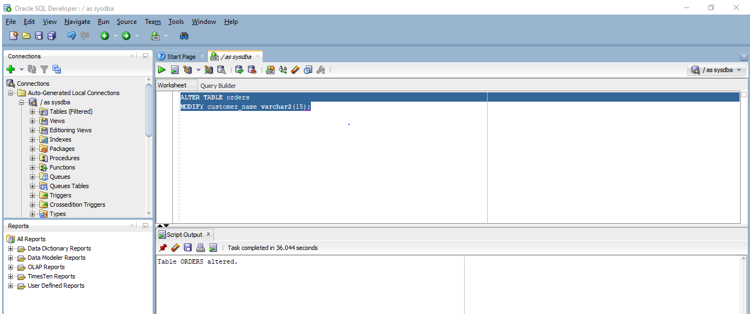
As you can see that the Script output shows that the table has been successfully altered.
4. Modify Multiple Columns Using Alter Statement
Just as we could add multiple columns in Oracle we can also modify multiple columns using MODIFY with ALTER TABLE statement. In the previous example, we used MODIFY to change the data type size for one column of a table. In this example, we will again use MODIFY but this time our query will modify two columns of orders table. The columns are ORDER_NAME and PAYMENT. Like in the previous example, we are going to write a query for the same.
Code:
ALTER TABLE orders
MODIFY (CUSTOMER_NAME varchar2(10),
PAYMENT varchar2(10));
So, we have modified the size for both columns to 10. Let us now run the query in SQL developer to check the output. The below screenshot shows the output of the query in SQL developer.
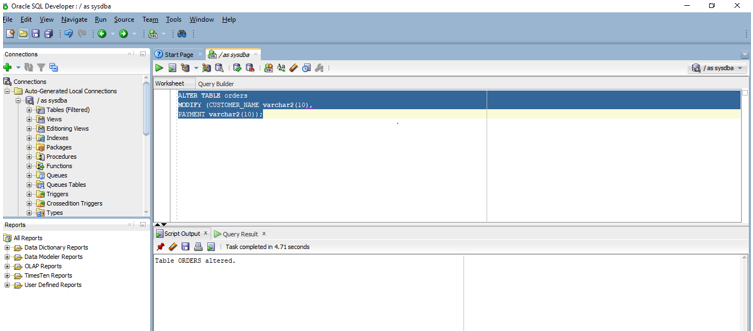
So, as per the output shown above both, the columns have been altered.
5. Rename a Column Using Alter Table
We can use the RENAME keyword with the ALTER TABLE statement to rename a column of a table. It will again be a DDL query as we are altering the table structure. In this example, we will rename the column PAYMENT of orders table to PAYMENT_MODE. Let us now write the query for the same.
Code:
ALTER TABLE orders
RENAME column PAYMENT to PAYMENT_MODE;
Let us now run the query in the sql developer. The below screenshot shows us the output of the query.