Core c6 state что это
Процессоры Intel поддерживают несколько технологий для оптимизации энергопотребления. В этой статье (перевод [1]) дается обзор p-состояний (оптимизация напряжения питания и частоты CPU во время работы) и c-состояний (оптимизация потребления мощности, если ядро не выполняет ни одной инструкции).
[P-состояния]
Во время выполнения кода операционная система и CPU могут оптимизировать энергопотребление с помощью различных P-состояний (P это сокращение от «performance», что означает «производительность»). В зависимости от требований, CPU работает на разных частотах. Состояние P0 соответствует самой высокой частоте (с самым высоким напряжением питания).
Для процессоров Intel до архитектуры Haswell/Broadwell, желаемая частота (и соответствующее ей напряжение питания) указывается операционной системой путем записи соответствующих величин в специальные регистры процессора [2][3].
В архитектуре Skylake операционная система может оставить управление P-состояниями аппаратуру CPU (Speed Shift Technology, Hardware P-states [4]). С Kaby Lake эти функции были дополнительно оптимизированы [5].

Speed Schift (сдвиг скорости). P-состояния определяются в BIOS, и управляются операционной системой. Технология Speed Schift дает полное или частичное управление частотой тактирования CPU (может осуществляться либо во всем диапазоне, либо в узком окне). Speed Schift требует поддержки со стороны операционной системы (Windows 10 с новыми обновлением эту функцию поддерживает), также требуется любой процессор Intel 6 Skylake. Сдвиг скорости означает ускоренный отклик на запросы изменения производительности со стороны ПО (JavaScript, инструменты офиса, веб-браузеры). Технология сдвига скорости обеспечивает увеличение производительности для обычных задач, при этом незначительно снижается общее энергопотребление, т. е. эффективность работы всей системы повышается.
[C-состояния]
В отличие от P-состояний, которые были разработаны для регулирования потребления мощности во время выполнения кода (т. е. в нормальном рабочем состоянии процессора), C-состояния используются для оптимизации энергопотребления в режиме ожидания (idle mode, т. е. когда никакой код процессором не выполняется).
Типовые C-состояния следующие:
C0 – Active Mode: код выполняется, это состояние соответствует одному из P-состояний.
C1 – Auto Halt (автоматическая приостановка).
C1E – Auto halt, low frequency, low voltage (автоматическая приостановка с пониженной частотой и напряжением питания).
C2 – Временное состояние перед переходом в C3. Память в рабочем состоянии.
C3 – Сброс кэшей L1/L2 (flush), выключение тактовых частот.
C6 – Сохранение состояний ядра перед выключением, и выключение PLL (т. е. прекращение синтеза тактовых частот).
C7 – C6, плюс может быть сброшен LLC (LLC означает кэш самого высокого уровня, т. е. самая медленная память кэш).
C8 – C7, плюс должен быть сброшен LLC.

Примечание *: показано в грубом приближении.
C-состояния можно отличить друг от друга по C-состояниям ядра (Core C-states или CC-states), состояниям корпуса (Package C-states или PC-states) и логическим состояниям. В большинстве случаев операционная система устанавливает определенное состояние для ядра путем выполнения команды MWAIT.

Примечание: «состояние ядра» (core state) относится к ядру, которое находится в состоянии самого большого потребления энергии (наиболее активно).
[Запрет в BIOS функции CPU Power Saving]
В некоторых случаях рекомендуется деактивировать в BIOS настройки экономии питания CPU. Здесь показано, где найти эти опции и как их запретить, чтобы опции управления питанием (CPU P State Control и CPU C State Control) были полностью запрещены в BIOS (на примере материнской платы Supermicro X10DRi и процессора Intel Xeon E5 2620v4.
Как запретить CPU Power Saving:
1. Во время начального процесса загрузки (сразу после включения питания или сброса) нажмите специальную клавишу для входа в BIOS. Чаще всего это Del (Delete) или F2, для материнской платы Supermicro X10DRi это клавиша Delete.
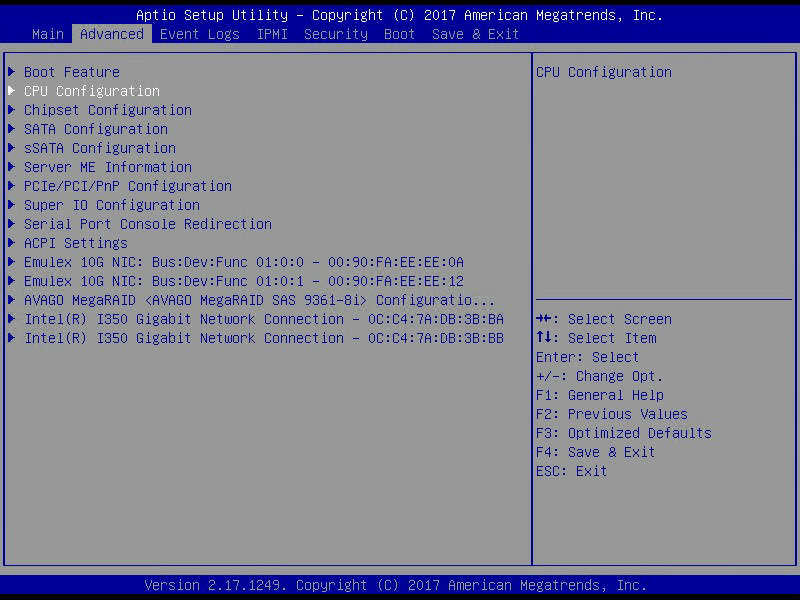
2. Перейдите в раздел настроек Advanced CPU Configuration -> Advanced Power Management Configuration.

3. Поменяйте настройку Power Technology в состояние Custom и Energy Efficient Turbo в состояние Disable.
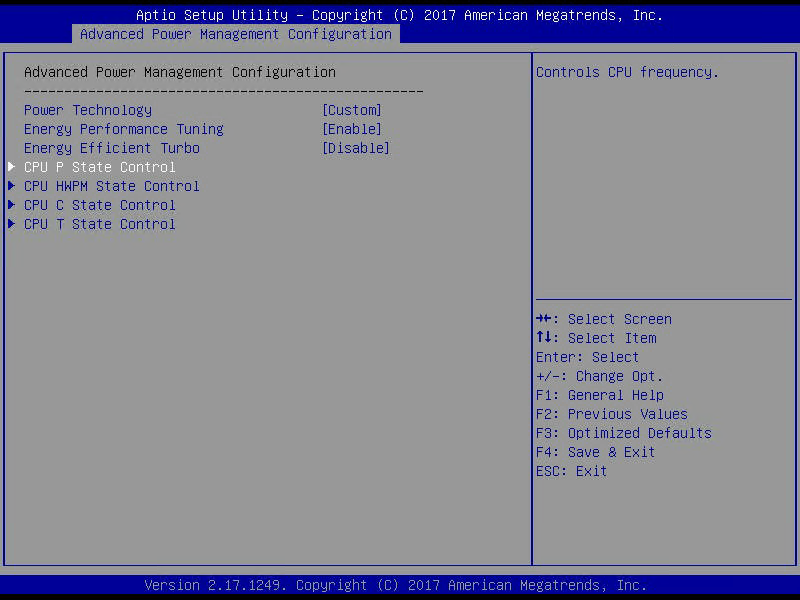
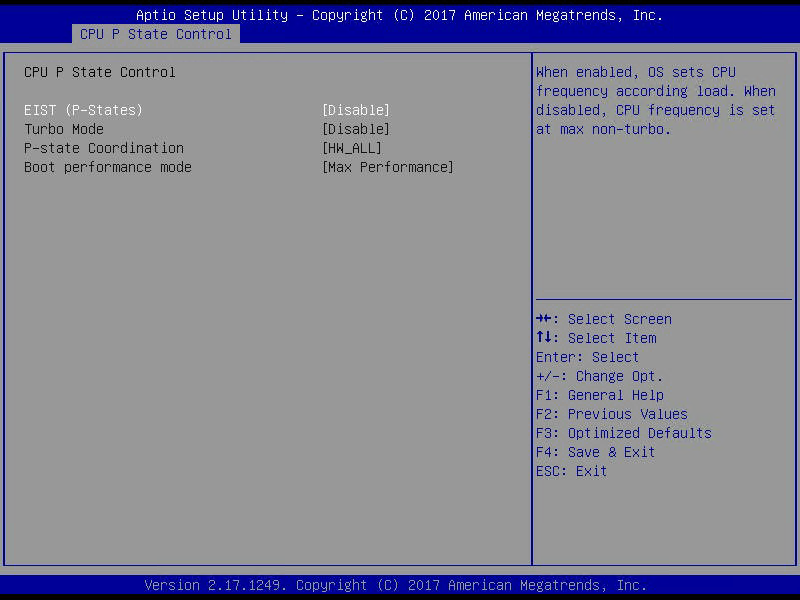
4. Перейдите в раздел CPU P State Control, деактивируйте EIST (P-States) and Turbo Mode.
5. Перейдите в раздел CPU C State Control, поменяйте Package C State Limit на C0/C1 state и деактивируйте CPU C3 Report, CPU C6 Report и Enhanced Halt State (C1E).
Core C6 Enabled or Disabled? (For overclocking an FX-6300) + Other questions
I currently have Core C6 State enabled on my overclock of my FX-6300 which is currently:

With it disabled, I idle at about 38-40 degrees, and with it I idle at around 32-34 degrees.
But with it enabled I fail IntelBurnTest, and with it disabled I fail IntelBurnTest. So will bringing up my voltages make my CPU stable while having C6 enabled to lower my temps when idle?
Also, should I enable or disable LLC (Load-line Calibration)?
It’s currently disabled, with it enabled AI Suite II was giving me errors that my voltages were going above 1.6.
Finally, should I lower or keep my RAM voltages of 1.54375? Since my BUS speed is 205, which raises the speed of the RAM.
Thanks for reading, and thanks in advance for helping.
Slayr288
Honorable
I upped my CPU voltage from 1.39375 to 1.4. Ran IntelBurnTest. BSOD.
Upped from 1.4 to 1.40625. Ran IntelBurnTest. Passed with 2 thermal throttles when hitting 60 degrees, it was barely hitting 60, I could have disabled thermal throttling and it would have probably maxed at around 61. (This is all with C6 enabled. If it was disabled I would have throttled 3-4 times and idled at around 38-40 degrees, but at 1.39375 vCore.
biopolar
Honorable
I usually leave C6 enabled. Always have. Not looking at BIOS right now, haha, but if I remember from memory, C6 merely helps keep the CPU from consuming more energy than it needs.
It makes sense that your temps would rise if you disabled it.
I’m running @ 4.5 on an 8350, vCore @ 1.4375, and idling around 15-20C. Maxxing 54C when stressed to 100% cpu load.
Typically I never mess with RAM voltages. I’ve kept them at auto and a static frequency of 1600 (my default RAM freq).
Are you OC’ing through that program in the picture above or through BIOS?
Slayr288
Honorable
I usually leave C6 enabled. Always have. Not looking at BIOS right now, haha, but if I remember from memory, C6 merely helps keep the CPU from consuming more energy than it needs.
It makes sense that your temps would rise if you disabled it.
I’m running @ 4.5 on an 8350, vCore @ 1.4375, and idling around 15-20C. Maxxing 54C when stressed to 100% cpu load.
Typically I never mess with RAM voltages. I’ve kept them at auto and a static frequency of 1600 (my default RAM freq).
Are you OC’ing through that program in the picture above or through BIOS?
No, I would never OC from that program, lol.
I’m overclocking from BIOS.
ffejster25
Honorable
I currently have Core C6 State enabled on my overclock of my FX-6300 which is currently:
With it disabled, I idle at about 38-40 degrees, and with it I idle at around 32-34 degrees.
But with it enabled I fail IntelBurnTest, and with it disabled I fail IntelBurnTest. So will bringing up my voltages make my CPU stable while having C6 enabled to lower my temps when idle?
Also, should I enable or disable LLC (Load-line Calibration)?
It’s currently disabled, with it enabled AI Suite II was giving me errors that my voltages were going above 1.6.
Finally, should I lower or keep my RAM voltages of 1.54375? Since my BUS speed is 205, which raises the speed of the RAM.
Thanks for reading, and thanks in advance for helping.
I am using a fx 6300 as well. overclocked to 4.4ghz vcore 1.44v c6 is enabled everything else is disabled besides the svm. I think your voltage is to low to run at 4.3 that’s your problem.
you also shouldn’t use the FSB to overclock. just use the multiplier in the bios. unless your overclocking the RAM you should not touch anything about it. otherwise you should set the RAM manually always to the rated specs of your RAM. like I am using 8gb g skill 1866 CL8. default always is 1600. 1.49v. to get 1866 it needs 1.50. I set that manually and added .05 to make it 1.55v just to make sure. then I bumped the CPU-NB voltage up .05 as well to stabilize that speed. CPU idle around 40 to 45c depending on temp of room. which is normal and safe. these CPU’s can handle more than most think. download amd over drive it will tell you the thermal margin.
spladam
Distinguished
I currently have Core C6 State enabled on my overclock of my FX-6300 which is currently:
With it disabled, I idle at about 38-40 degrees, and with it I idle at around 32-34 degrees.
But with it enabled I fail IntelBurnTest, and with it disabled I fail IntelBurnTest. So will bringing up my voltages make my CPU stable while having C6 enabled to lower my temps when idle?
Also, should I enable or disable LLC (Load-line Calibration)?
It’s currently disabled, with it enabled AI Suite II was giving me errors that my voltages were going above 1.6.
Finally, should I lower or keep my RAM voltages of 1.54375? Since my BUS speed is 205, which raises the speed of the RAM.
Thanks for reading, and thanks in advance for helping.
I am using a fx 6300 as well. overclocked to 4.4ghz vcore 1.44v c6 is enabled everything else is disabled besides the svm. I think your voltage is to low to run at 4.3 that’s your problem.
you also shouldn’t use the FSB to overclock. just use the multiplier in the bios. unless your overclocking the RAM you should not touch anything about it. otherwise you should set the RAM manually always to the rated specs of your RAM. like I am using 8gb g skill 1866 CL8. default always is 1600. 1.49v. to get 1866 it needs 1.50. I set that manually and added .05 to make it 1.55v just to make sure. then I bumped the CPU-NB voltage up .05 as well to stabilize that speed. CPU idle around 40 to 45c depending on temp of room. which is normal and safe. these CPU’s can handle more than most think. download amd over drive it will tell you the thermal margin.
Just came across this, I understand that the FX processors scale better when using the FSB multiplier, some have said it increases the single core processing ability (makes sense). I was going to try that today and ran across this.
ffejster25
Honorable
I currently have Core C6 State enabled on my overclock of my FX-6300 which is currently:
With it disabled, I idle at about 38-40 degrees, and with it I idle at around 32-34 degrees.
But with it enabled I fail IntelBurnTest, and with it disabled I fail IntelBurnTest. So will bringing up my voltages make my CPU stable while having C6 enabled to lower my temps when idle?
Also, should I enable or disable LLC (Load-line Calibration)?
It’s currently disabled, with it enabled AI Suite II was giving me errors that my voltages were going above 1.6.
Finally, should I lower or keep my RAM voltages of 1.54375? Since my BUS speed is 205, which raises the speed of the RAM.
Thanks for reading, and thanks in advance for helping.
I am using a fx 6300 as well. overclocked to 4.4ghz vcore 1.44v c6 is enabled everything else is disabled besides the svm. I think your voltage is to low to run at 4.3 that’s your problem.
you also shouldn’t use the FSB to overclock. just use the multiplier in the bios. unless your overclocking the RAM you should not touch anything about it. otherwise you should set the RAM manually always to the rated specs of your RAM. like I am using 8gb g skill 1866 CL8. default always is 1600. 1.49v. to get 1866 it needs 1.50. I set that manually and added .05 to make it 1.55v just to make sure. then I bumped the CPU-NB voltage up .05 as well to stabilize that speed. CPU idle around 40 to 45c depending on temp of room. which is normal and safe. these CPU’s can handle more than most think. download amd over drive it will tell you the thermal margin.
Just came across this, I understand that the FX processors scale better when using the FSB multiplier, some have said it increases the single core processing ability (makes sense). I was going to try that today and ran across this.
I would not use the FSB to overclock.. most people don’t. its best just to bump up the voltage and the multiplier. and any power saving features should be off too. I am now at 4.8ghz at 1.488 volts. I tried 1.475 but it wasn’t enough. under prime95 it stays right at 1.50 v. and runs fine. I do have the corsair H100i cooling my CPU now. you can get way more power out of the CPU if you do it manually and not with the FSB