PXImouse, what does this executable do?
PXImouse is a program that is often ignored until someone accuses it of being an insidious virus or keylogger that tracks your movements and reports back to a faceless corporation.
In truth, PXImouse is a helpful tool that makes sure your mouse operates properly on a day to day basis if you have a mouse that uses a sensor manufactured by the company PixArt.
PXImouse runs on startup and runs in the background of the computer unless it has reason to actively consume the system resource.
Table of Contents
What is PXImouse
PXImouse, related to other names such as TiltWheelMouse.exe and PixArt Mouse Commander, is a program installed on your computer. You may see this program if you open the Task Manager to take a look at what is running on your computer at any given time.

PXImouse is one of the drivers necessary for certain mice to function, and is often an executable file that installs and runs on its own when you plug a compatible device into your machine.
For the most part, you shouldn’t even notice that PXImouse is there unless you run into an issue with your mouse and you need to uninstall and reinstall the drivers for it to work properly again.
What does
PXImouse is an executable file that offers driver support to mice with PixArt sensors, that is, sensor chip technology produced by PixArt Imaging Inc. and will usually install automatically when you plug in a mouse that requires it.
PXImouse can sometimes cause an issue if you have an old or obsolete version of the software installed on your computer, a file also known as TiltWheelMouse.exe. If your computer is running slowly or your mouse is not working properly, it could be due to an issue with these driver files. In some cases, TiltWheelMouse.exe when it is out of date can cause error messages such as:
- pximouse has stopped working. Windows is checking for a solution to the problem… (Windows Operating System versions 10, 8, and 7)
- pximouse has stopped working. A problem caused the program to stop working correctly. Windows will close the program and notify you if a solution is available. (Windows Operating System versions 10, 8, and 7)
- TiltWheelMouse.exe has encountered a problem and needs to close. (Windows Operating System version XP)
- Access violation at address FFFFFFFF in module TiltWheelMouse.exe. Read of address 00000000.
Another problem you can encounter if TiltWheelMouse.exe is out of date, is that there are several malware programs that have found a way to hide by impersonating this executable file and hiding in your machine. By making sure the software versions are always up to date, you can mitigate the chance that an unauthorized program is running on your computer.
The possibility that a malicious program is hiding in these driver sets brings us to our next point, whether or not PXImouse is a virus.
Is PXImouse a virus?
No, PXImouse is not a virus. PXImouse is simply a driver that helps the functionality of some of the mice available on the market, particularly with regard to the side buttons and other expanded functions of the mouse beyond simple point and click applications from the optical sensor.
There have been some concerns that PXImouse is a virus or a keylogger, but this is not the case. These concerns stem from a similar program called TiltWheelMouse.exe, which, when it is a legitimate file, will live in the System folder on your computer.
There are cases of malware hiding itself in the computer by masquerading as TiltWheelMouse.exe unrelated to the pximouse process and it can present itself in different locations around the computer.

If you find an instance of TiltWheelMouse.exe that is not under the System folder on your C drive (your main hard drive) then you should take a careful look at it because it may not be related to pximouse.exe and furthermore could contain malware harmful to your computer.
If you are concerned about the executable files on your computer related to the pximouse service or the TiltWheelMouse.exe, you can upload the .exe file to a website that will scan it for malware and report to you if the file is safe or not.
Many websites exist that offer this feature, like virustotal.com and they offer this service for free because when a new virus is found, that information is used to create patches and updates for operating systems, helping to protect other people from falling victim to the same malware again.
PixArt Imaging Startup
If you are using a mouse that requires PXImouse, more than likely your computer will run this program on startup so that you have the ability to use your mouse when you are logging in and on every screen thereafter.
If you disable the PXImouse application and you have a mouse with a sensor by PixArt, then there is a chance you will also disable your mouse’s ability to function. This could be a total loss of mouse function or only a few features could be gone. If your mouse stops working because you have disabled this program, there are only a couple of options to fix it:
- Plug in a different mouse that does not require the PXImouse process in order to work, then re-enable and/or reinstall PXImouse on your computer so that you can use your original mouse again.
- Use keystrokes until you can get into your computer, then reinstall and/or re-enable PXImouse so that you can use your original mouse again.
I highly recommend taking the first option. Having the ability to point and click, particularly when it comes to installing software, is an incredible benefit. Using keystrokes is slow and inefficient, not to mention the fact that there are some things that do not lend themselves well to working with keystrokes such as navigating the Windows menus with any sort of alacrity.
It is much better to use one of the other mice that are inevitably hanging around in your house somewhere and try to find one that does not use a PixArt sensor (bonus points if you still have a rollerball mouse and a motherboard with a port you can connect it to) because then you can simply log in, get the program going again, and go back to using the mouse you had in the first place before you started playing around with settings.
Pixart Imaging and PXImouse
PixArt Imaging Inc. is a manufacturer of various kinds of optics including CMOS image sensors, capacitive touch controllers, and sensor chip designs. It is currently one of the biggest suppliers of optical mouse sensors for conventional and high-end mice for both general computer use and high end gaming.
One of the features of PixArt and their sensors is that they use proprietary algorithms. This, paired with their short design cycles, requires that the sensor interacts with software on the computer in order to ensure that everything is working properly and the mouse operates smoothly during every use.
PXImouse software running in the background of my computer
If it is installed on your computer, the PXIMouse process is one that will run in the background every time your computer turns on. It will consume varying levels of memory, particularly if it is trying to reach out and detect whether or not there is a PixArtmouse attached to the system for which it needs to provide driver support.

If you notice significant slowing on your computer, or you see that it is taking up extra system resources that could be diverted elsewhere make sure that you do, in fact, use a mouse that requires PXImouse in order to operate properly.
If you know you have stopped using a mouse that requires this driver and doesn’t want it consuming system resources, uninstall it, but remember that if your mouse does require PXImouse then you could seriously break its functionality by disabling the program.
Чистка автозагрузки
Чистка автозагрузки, инструкция, объяснения, советы и комментарии. Таблица с конкретными записями автозагрузки, например, program program.
Зачем нужно чистить автозагрузку?
Множество программ при установке добавляют себя в автозагрузку, что бы вместе с рабочим столом включались и функционировали некоторые функции, модули, программы. Например, установили драйвер для принтера, а он в автозагрузку поставил программу, которая будет следить за процессом печати. Может получится ситуация, что у вас в автозагрузке будет очень много лишнего, и компьютер из-за этого будет долго думать.
Как почистить автозагрузку?
Для этого необходимо зажать кнопку Windows(кнопка с логотипом Windows) и нажать R. Появится окно «Выполнить». Если не получается найти кнопку, или не открывается окно, то его можно открыть через пуск — Пуск \ все программы \ стандартные \ выполнить. В Windows 10 автозагрузка доступна в Диспетчере задач (ALT + CTRL + Del).
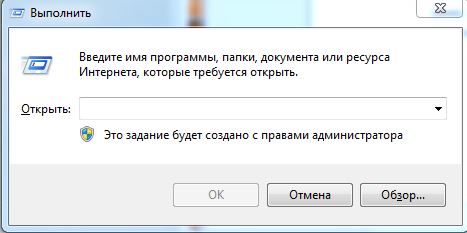
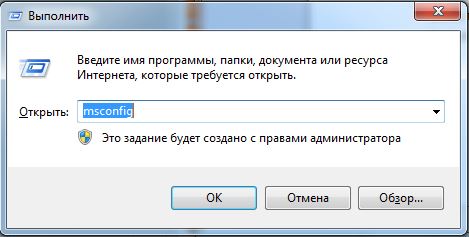
В открывшееся окно пишем "msconfig" и нажимаем enter или OK.
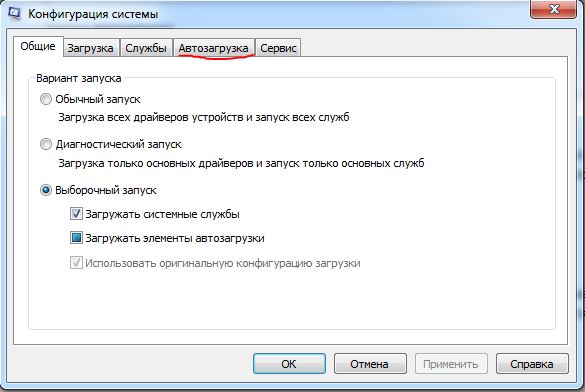
Откроется следующее окно, переходим во вкладку Автозагрузка.
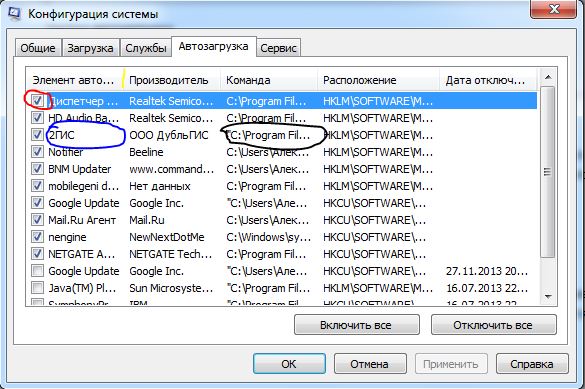
Красным обвел пункт, который свидетельствует о активации пункта. Если стоит галочка, то программа включается вместе с компьютером, если нет, то программа не запускается автоматически. Синим обведено название пункта. Черным обвел путь, от куда запускается программа. Если вам не видно название или путь полностью, то нужно растянуть нужным вам столбец. Обратите внимание на разделители, на разделитель у названия я выделил желтым. Наводим указатель, он измениться со стрелочки на палку с двумя стрелками в бока. Зажимаем левую кнопку мыши и ведем вправо до тех пор, пока не растяните до нужного размера.
В Windows 10 достаточно нажать правой кнопкой мыши по пункту и выбрать "Отключить".
Как понять какую программу можно отключить?
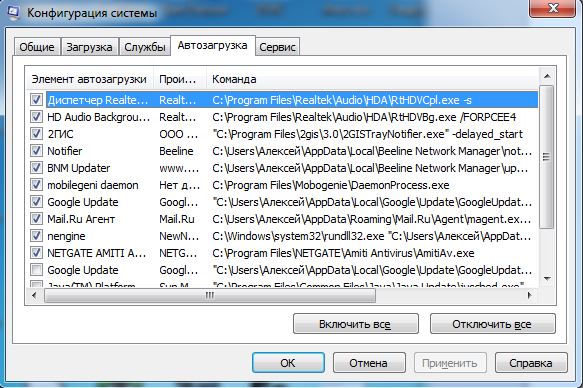
Трудно описать любую программу, которая может вас там встретиться. Рассмотрим то, что запускается на моем компьютере. Вообще программы должны запускаться из Program Files или из Windows — всё, что загружается из других папок под подозрением. Первый пункт Диспетчер Realtek, второй пункт HD Audio — это компоненты звукового драйвера, не отключайте. Следующий пункт 2гис, он нужен для поиска обновлений базы дубльгиса и самой программы. Вы вполне можете вручную запускать обновления, хотя по большому счету много ресурсов на себя он не возьмет. В общем, если хотите, можете отключить. Следующие два пункта Notifer и BNM Updater, загружаются из другой папки, это сомнительные пункты. Это компоненты от специальной программы от билайна, у меня компьютер подключен по Wi-Fi к роутеру, и в общем мне эти компоненты не нужны. Если у вас нет роутера, и кабель входящий в квартиру сразу входит в компьютер, то в случаи если у вас билайн не отключайте, в любом другом случаи конкретно эти два пункта можно отключить. Следующая программа mobilegeni daemon, она служит для синхронизации данных между компьютером и устройством на базе Android. Однозначно данную программу стоит отключить. Следующая Google Update, обновление программ от гугла, например, гугл хром. Можете отключить. Далее майл агент, но тут момент, при следующем включении агента он опять добавит себя в автозагрузку, это в нем самом отключать надо. Следующие два пункта это антивирус — Amiti Antivirus.
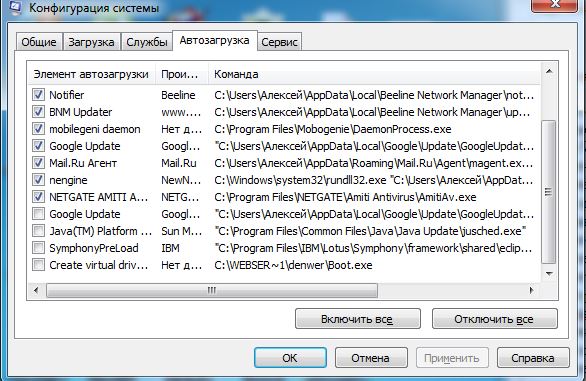
Далее у меня 4 пункта, которые уже отключены. Уже ранее отключенный Google Update, видимо после отключения еще раз прописался. Java Platform нужна для работы программ построенных на базе языка Java, в общем, в большинстве случаев требуется для онлайн банкинга. Если вы не пользуетесь онлайн банками, и не используете специальные банковские или бухгалтерские программы. SymphonyPreLoad это еще один бесплатный аналог Word, в общем можно спокойно отключить, даже если вы его используете. Последнее Create virtual drive, это денвер, программа специальная для локального веб сервера, если вы не понимаете, что это такое, то его точно можно отключить.
Если "daemon" это полное название файла в автозагрузке, то это скорее всего вирус, если нет, то стоит искать по полному названию файла \ программы.
Стоит убрать из автозагрузки, и если она снова в ней появится, то можно установить другую программу для чтения pdf файлов, на нашем сайте их представлено достаточно много.
Если такой программы у вас нет и не было, то это может быть вирус.
Dr.web cureit можно использовать только для дома, и только для личный \ некоммерческих целей.
Если вы сомневаетесь в каких-то файлах в автозагрузке, то всегда можно проверить их при помощи VirusTotal (Наберите в поиске и первая же ссылка будет на их сайт).
What is PXIMouse? a Virus or Keylogger? Here’s Answer
If you’ve recently spotted PXIMouse in your background processes and worried about its appearance in your system, you are at the right place.
Let me clear first thing first, and it is not a virus or a keylogger. PXIMouse is a PixArt Imaging Inc software/app responsible for displaying mouse pointer animation for specific mice from several brands. Speaking about the software’s keyboard is a crucial part of PC, and these Gaming Keyboards are the best options to go for if you are looking for one.
There are many queries related to PXIMouse being a keylogger and a virus. Most of the users suggested to scan files through virustotal.com and try the scanning system with an antivirus. All of that effort is of no use because it is not a keylogger or a virus (at least that’s what I know). By visiting many online forums and platforms, I searched, and then I am writing this article to make sure that nobody gets its PC hurt by some malware, virus, or a keylogger.
What is PXIMouse?
PXIMouse by Pixart Imaging Inc is a script/software responsible for showing mouse pointer animation on your computer. It is added into background tasks when you plugin certain types of the mouse into your PC/Laptop. Do not disable it or end a process named PXIMouse.exe; otherwise, you might end up having your mouse pointer disabled.
PXIMouse is a Virus?
It is not a virus; to make sure it is not, you can scan it through many online tools and also with your antivirus program. However, all of such effort would be for nothing because it is installed and run when you plugin-specific mouse into your computer. If you remember not having it earlier, and it starts suddenly appearing, you might have changed your mouse or upgraded it to a new one. That is the reason described on many online forums related to the PXIMouse myth. If you were into trouble of thinking it as a virus, don’t worry, it is a safe program for a specific task, as I stated earlier.
If you still have any confusion about this software, do share it in the comment section.