Обработка пропусков в Pandas
К примеру, можно использовать число -9999 или редко встречающееся сочетание битов. Более часто встречающийся способ — условное обозначение через NaN. NaN — это специальное значение, определенное спецификацией IEEE для чисел с плавающей точкой и используется во многих ЯП.
У метода есть ограничения. Во-первых использование значений индикаторов может привести к дополнительным не оптимизированным расчетам. Во-вторых NaN доступен не для всех типов данных.
Использование масок
Можно создать отдельный булевый массив, индицирующий пропущенные значения. В ряде языков выделяется отдельный бит для разметки пропусков в массиве данных локально. Оба подхода влекут за собой перерасход памяти.
Как это реализовано в Pandas?
Pandas построена на NumPy, в котором отсутствует понятие пропуска для всех данных кроме данных с плавающей точкой. NumPy поддерживает маски, но использование такого подходжа в Pandas влечет значительные накладные расходы на хранение, вычисление и поддержку кода.
В итоге в Pandas используется:
Объект None
None — объект python. Его нельзя использовать в NumPy и во всех производных массивах Pandas. None используется только в массивах с типом object. Когда мы создаем массив, используя None, автоматически создается массив с типом object.
Тип object означает, что NumPy не смог установить тип объектов массива, единственное что он знает — это то, что это объекты python. Операции с такими массивами будут производится на уровне языка python, т.е. со всеми накладными расходами, присущими языку с динамической типизацией. Оптимизация NumPy работать не будет.
Кроме того, функции агрегирования по массиву, например, massive.sum() или massive.min() выбросят ошибку, так как операции между численным значением и значением None не определены
Объект NaN
Объект NaN определяет отсутствие числового значения с плавающей точкой. Это вызывает некоторые проблемы — если NaN попадает в массив, все данные приводятся к числам с плавающей точкой. Кроме того, все операции с NaN приводят к NaN, в том числе и функции агрегирования.
Не забудьте, что для вызова объекта NaN нужен NumPy
Nan и None
Pandas преобразует None в NaN, если оба будут встречены в одном массиве. Естественно, осуществляется и повышающее преобразование с приведением всех непустых числовых значений к числу с плавающей точкой, а всех остальных к NaN.
Правила повышающих преобразований типов в Pandas (строки всегда хранятся как object)
| Typeclass | Conversion When Storing NAN | NAN Sentinel Value |
|---|---|---|
| floating | No change | np.nan |
| object | No change | None or np.nan |
| integer | Cast to float64 | np.nan |
| boolean | Cast to object | None or np.nan |
Операции над пустыми значениями
В Pandas доступно несколько методов:
isnull() — генерирует булеву маску для отсутствующих значений
notnull() — тоже для непустых
dropna() — фильтрация данных по отсутствующим значениям
fillna() — замена пропусков с возвратом копии
Методы доступны как для объектов Series так и для dataFrame (с выбором измерения).
Кроме того, для dropna() ожно задать дополнительные параметры. how=’any’ задан по дефолту, можно переопределить как ‘all’ — будут отбрасываться только полностью пустые строки/столбцы. thresh задает минимальное значение непустых значений, выше которого строки/столбцы не отбрасываются.
Для fillna() доступно несколько аргументов. method=’ffill’ и method=’bfill’ определяют какими значениями будут заполняться пропуски (предыдущими или последующими в массиве).
Все статьи с тегом pandas
-
(25 Jul 2020)
(18 Apr 2020)
(30 Mar 2020)
(04 Mar 2020)
Как понять translating алгоритмы для графов?
Translating алгоритмы (а точнее TransE), рассматриваются в курсе cs224w, про них есть домашка и они фигурируют в нескольких последних лекциях.
Обозначения в анализе алгоритмов
В асимптотическом анализе алгоритмов принято использовать базовые обозначения, позволяющие формализовать сложность алгоритма. Все термины сводятся к устранению постоянных коэффициентов, так.
Working with missing data
In this section, we will discuss missing (also referred to as NA) values in pandas.
The choice of using NaN internally to denote missing data was largely for simplicity and performance reasons. Starting from pandas 1.0, some optional data types start experimenting with a native NA scalar using a mask-based approach. See here for more.
See the cookbook for some advanced strategies.
Values considered “missing”
As data comes in many shapes and forms, pandas aims to be flexible with regard to handling missing data. While NaN is the default missing value marker for reasons of computational speed and convenience, we need to be able to easily detect this value with data of different types: floating point, integer, boolean, and general object. In many cases, however, the Python None will arise and we wish to also consider that “missing” or “not available” or “NA”.
If you want to consider inf and -inf to be “NA” in computations, you can set pandas.options.mode.use_inf_as_na = True .
To make detecting missing values easier (and across different array dtypes), pandas provides the isna() and notna() functions, which are also methods on Series and DataFrame objects:
One has to be mindful that in Python (and NumPy), the nan’s don’t compare equal, but None’s do. Note that pandas/NumPy uses the fact that np.nan != np.nan , and treats None like np.nan .
So as compared to above, a scalar equality comparison versus a None/np.nan doesn’t provide useful information.
Integer dtypes and missing data
Because NaN is a float, a column of integers with even one missing values is cast to floating-point dtype (see Support for integer NA for more). pandas provides a nullable integer array, which can be used by explicitly requesting the dtype:
Alternatively, the string alias dtype=’Int64′ (note the capital "I" ) can be used.
Datetimes
For datetime64[ns] types, NaT represents missing values. This is a pseudo-native sentinel value that can be represented by NumPy in a singular dtype (datetime64[ns]). pandas objects provide compatibility between NaT and NaN .
Inserting missing data
You can insert missing values by simply assigning to containers. The actual missing value used will be chosen based on the dtype.
For example, numeric containers will always use NaN regardless of the missing value type chosen:
Likewise, datetime containers will always use NaT .
For object containers, pandas will use the value given:
Calculations with missing data
Missing values propagate naturally through arithmetic operations between pandas objects.
The descriptive statistics and computational methods discussed in the data structure overview (and listed here and here ) are all written to account for missing data. For example:
When summing data, NA (missing) values will be treated as zero.
If the data are all NA, the result will be 0.
Cumulative methods like cumsum() and cumprod() ignore NA values by default, but preserve them in the resulting arrays. To override this behaviour and include NA values, use skipna=False .
Sum/prod of empties/nans
This behavior is now standard as of v0.22.0 and is consistent with the default in numpy ; previously sum/prod of all-NA or empty Series/DataFrames would return NaN. See v0.22.0 whatsnew for more.
The sum of an empty or all-NA Series or column of a DataFrame is 0.
The product of an empty or all-NA Series or column of a DataFrame is 1.
NA values in GroupBy
NA groups in GroupBy are automatically excluded. This behavior is consistent with R, for example:
See the groupby section here for more information.
Cleaning / filling missing data
pandas objects are equipped with various data manipulation methods for dealing with missing data.
Filling missing values: fillna
fillna() can “fill in” NA values with non-NA data in a couple of ways, which we illustrate:
Replace NA with a scalar value
Fill gaps forward or backward
Using the same filling arguments as reindexing , we can propagate non-NA values forward or backward:
Limit the amount of filling
If we only want consecutive gaps filled up to a certain number of data points, we can use the limit keyword:
To remind you, these are the available filling methods:
Fill values forward
Fill values backward
With time series data, using pad/ffill is extremely common so that the “last known value” is available at every time point.
ffill() is equivalent to fillna(method=’ffill’) and bfill() is equivalent to fillna(method=’bfill’)
Filling with a PandasObject
You can also fillna using a dict or Series that is alignable. The labels of the dict or index of the Series must match the columns of the frame you wish to fill. The use case of this is to fill a DataFrame with the mean of that column.
Same result as above, but is aligning the ‘fill’ value which is a Series in this case.
Dropping axis labels with missing data: dropna
You may wish to simply exclude labels from a data set which refer to missing data. To do this, use dropna() :
An equivalent dropna() is available for Series. DataFrame.dropna has considerably more options than Series.dropna, which can be examined in the API .
Interpolation
Both Series and DataFrame objects have interpolate() that, by default, performs linear interpolation at missing data points.
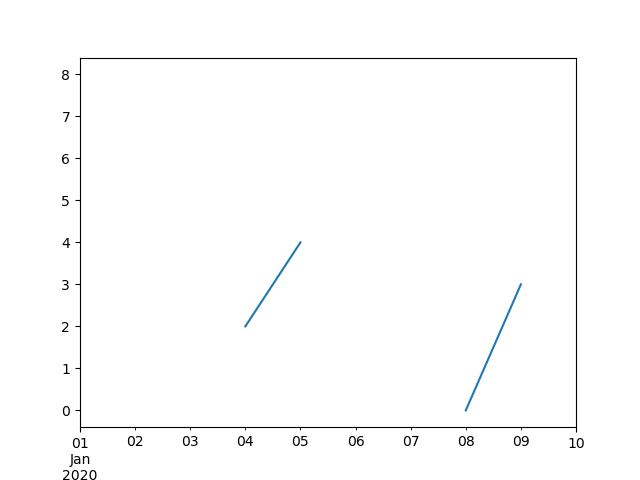
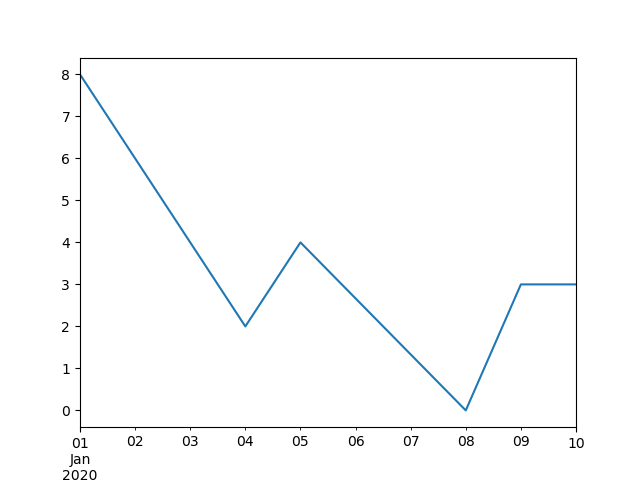
Index aware interpolation is available via the method keyword:
For a floating-point index, use method=’values’ :
You can also interpolate with a DataFrame:
The method argument gives access to fancier interpolation methods. If you have scipy installed, you can pass the name of a 1-d interpolation routine to method . You’ll want to consult the full scipy interpolation documentation and reference guide for details. The appropriate interpolation method will depend on the type of data you are working with.
If you are dealing with a time series that is growing at an increasing rate, method=’quadratic’ may be appropriate.
If you have values approximating a cumulative distribution function, then method=’pchip’ should work well.
To fill missing values with goal of smooth plotting, consider method=’akima’ .
These methods require scipy .
When interpolating via a polynomial or spline approximation, you must also specify the degree or order of the approximation:
Compare several methods:
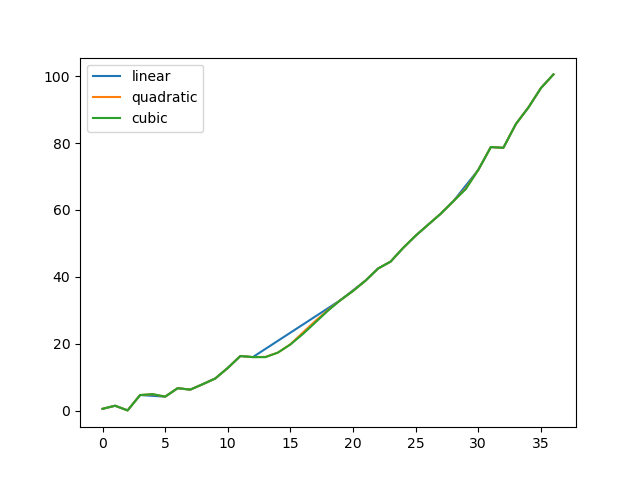
Another use case is interpolation at new values. Suppose you have 100 observations from some distribution. And let’s suppose that you’re particularly interested in what’s happening around the middle. You can mix pandas’ reindex and interpolate methods to interpolate at the new values.
Interpolation limits
Like other pandas fill methods, interpolate() accepts a limit keyword argument. Use this argument to limit the number of consecutive NaN values filled since the last valid observation:
By default, NaN values are filled in a forward direction. Use limit_direction parameter to fill backward or from both directions.
By default, NaN values are filled whether they are inside (surrounded by) existing valid values, or outside existing valid values. The limit_area parameter restricts filling to either inside or outside values.
Replacing generic values
Often times we want to replace arbitrary values with other values.
replace() in Series and replace() in DataFrame provides an efficient yet flexible way to perform such replacements.
For a Series, you can replace a single value or a list of values by another value:
You can replace a list of values by a list of other values:
You can also specify a mapping dict:
For a DataFrame, you can specify individual values by column:
Instead of replacing with specified values, you can treat all given values as missing and interpolate over them:
String/regular expression replacement
Python strings prefixed with the r character such as r’hello world’ are so-called “raw” strings. They have different semantics regarding backslashes than strings without this prefix. Backslashes in raw strings will be interpreted as an escaped backslash, e.g., r’\’ == ‘\\’ . You should read about them if this is unclear.
Replace the ‘.’ with NaN (str -> str):
Now do it with a regular expression that removes surrounding whitespace (regex -> regex):
Replace a few different values (list -> list):
list of regex -> list of regex:
Only search in column ‘b’ (dict -> dict):
Same as the previous example, but use a regular expression for searching instead (dict of regex -> dict):
You can pass nested dictionaries of regular expressions that use regex=True :
Alternatively, you can pass the nested dictionary like so:
You can also use the group of a regular expression match when replacing (dict of regex -> dict of regex), this works for lists as well.
You can pass a list of regular expressions, of which those that match will be replaced with a scalar (list of regex -> regex).
All of the regular expression examples can also be passed with the to_replace argument as the regex argument. In this case the value argument must be passed explicitly by name or regex must be a nested dictionary. The previous example, in this case, would then be:
This can be convenient if you do not want to pass regex=True every time you want to use a regular expression.
Anywhere in the above replace examples that you see a regular expression a compiled regular expression is valid as well.
Numeric replacement
Replacing more than one value is possible by passing a list.
You can also operate on the DataFrame in place:
Missing data casting rules and indexing
While pandas supports storing arrays of integer and boolean type, these types are not capable of storing missing data. Until we can switch to using a native NA type in NumPy, we’ve established some “casting rules”. When a reindexing operation introduces missing data, the Series will be cast according to the rules introduced in the table below.
Ordinarily NumPy will complain if you try to use an object array (even if it contains boolean values) instead of a boolean array to get or set values from an ndarray (e.g. selecting values based on some criteria). If a boolean vector contains NAs, an exception will be generated:
However, these can be filled in using fillna() and it will work fine:
pandas provides a nullable integer dtype, but you must explicitly request it when creating the series or column. Notice that we use a capital “I” in the dtype="Int64" .
Experimental NA scalar to denote missing values
Experimental: the behaviour of pd.NA can still change without warning.
New in version 1.0.0.
Starting from pandas 1.0, an experimental pd.NA value (singleton) is available to represent scalar missing values. At this moment, it is used in the nullable integer , boolean and dedicated string data types as the missing value indicator.
The goal of pd.NA is provide a “missing” indicator that can be used consistently across data types (instead of np.nan , None or pd.NaT depending on the data type).
For example, when having missing values in a Series with the nullable integer dtype, it will use pd.NA :
Currently, pandas does not yet use those data types by default (when creating a DataFrame or Series, or when reading in data), so you need to specify the dtype explicitly. An easy way to convert to those dtypes is explained here .
Propagation in arithmetic and comparison operations
In general, missing values propagate in operations involving pd.NA . When one of the operands is unknown, the outcome of the operation is also unknown.
For example, pd.NA propagates in arithmetic operations, similarly to np.nan :
There are a few special cases when the result is known, even when one of the operands is NA .
In equality and comparison operations, pd.NA also propagates. This deviates from the behaviour of np.nan , where comparisons with np.nan always return False .
To check if a value is equal to pd.NA , the isna() function can be used:
An exception on this basic propagation rule are reductions (such as the mean or the minimum), where pandas defaults to skipping missing values. See above for more.
Logical operations
For logical operations, pd.NA follows the rules of the three-valued logic (or Kleene logic, similarly to R, SQL and Julia). This logic means to only propagate missing values when it is logically required.
For example, for the logical “or” operation ( | ), if one of the operands is True , we already know the result will be True , regardless of the other value (so regardless the missing value would be True or False ). In this case, pd.NA does not propagate:
On the other hand, if one of the operands is False , the result depends on the value of the other operand. Therefore, in this case pd.NA propagates:
The behaviour of the logical “and” operation ( & ) can be derived using similar logic (where now pd.NA will not propagate if one of the operands is already False ):
NA in a boolean context
Since the actual value of an NA is unknown, it is ambiguous to convert NA to a boolean value. The following raises an error:
This also means that pd.NA cannot be used in a context where it is evaluated to a boolean, such as if condition: . where condition can potentially be pd.NA . In such cases, isna() can be used to check for pd.NA or condition being pd.NA can be avoided, for example by filling missing values beforehand.
A similar situation occurs when using Series or DataFrame objects in if statements, see Using if/truth statements with pandas .
NumPy ufuncs
pandas.NA implements NumPy’s __array_ufunc__ protocol. Most ufuncs work with NA , and generally return NA :
Currently, ufuncs involving an ndarray and NA will return an object-dtype filled with NA values.
The return type here may change to return a different array type in the future.
Conversion
If you have a DataFrame or Series using traditional types that have missing data represented using np.nan , there are convenience methods convert_dtypes() in Series and convert_dtypes() in DataFrame that can convert data to use the newer dtypes for integers, strings and booleans listed here . This is especially helpful after reading in data sets when letting the readers such as read_csv() and read_excel() infer default dtypes.
In this example, while the dtypes of all columns are changed, we show the results for the first 10 columns.
Python: как обрабатывать отсутствующие данные в Pandas DataFrame
Pandas — это библиотека Python для анализа и обработки данных. Почти все операции в pandas вращаются вокруг DataFrame s, абстрактной структуры данных, специально созданной для обработки метрической тонны данных.
В вышеупомянутой метрической тонне данных некоторые из них должны отсутствовать по разным причинам. В результате отсутствует значение ( null / None / Nan ) в нашем DataFrame .
Вот почему в этой статье мы обсудим, как обрабатывать отсутствующие данные в Pandas DataFrame .
Проверка данных
Наборы данных в реальном мире редко бывают идеальными. Они могут содержать отсутствующие значения, неправильные типы данных, нечитаемые символы, ошибочные строки и т. Д.
Первым шагом к правильному анализу данных является очистка и организация данных, которые мы будем использовать позже. Мы обсудим несколько распространенных проблем, связанных с данными, которые могут возникнуть в наборе данных.
Для этого мы будем работать с набором данных о небольших сотрудниках. .csv выглядит так:
Импортируем его в DataFrame :
Присмотревшись в наборе данных, мы отмечаем , что панды автоматически присваивают NaN , если значение для конкретного столбца является пустой строкой » NA или NaN . Однако бывают случаи, когда отсутствующие значения представлены настраиваемым значением, например строкой ‘na’ или 0 для числового столбца.
Например, 6-я строка имеет значение na для Team , а 5-я строка имеет значение 0 для столбца Salary
Настройка отсутствующих значений данных
В нашем наборе данных мы хотим рассматривать их как отсутствующие значения:
- Значение 0 в столбце Salary
- Значение na в столбце Team
Этого можно добиться, используя na_values для установки пользовательских пропущенных значений. Этот аргумент представляет словарь, где ключи представляют имя столбца, а значение представляет значения данных, которые следует рассматривать как отсутствующие:
С другой стороны, если мы хотим отобразить список значений, которые должны рассматриваться как отсутствующие значения во всех столбцах, мы можем передать список кандидатов, которые мы хотим глобально рассматривать как отсутствующие значения, в параметр na_values
Обратите внимание, что здесь значение Gender в 4-й строке NaN поскольку мы определили na как отсутствующее значение выше.
Выбор реализации зависит от характера набора данных.
Например, для некоторых числовых столбцов в наборе данных может потребоваться трактовка 0 как отсутствующего значения, а для других столбцов — нет. Следовательно, вы можете использовать первый подход, когда вы настраиваете отсутствующие значения на основе столбцов.
Точно так же, если мы хотим обрабатывать 0 например, как отсутствующее значение в глобальном масштабе, мы можем использовать второй метод и просто передать массив таких значений аргументу na_values
После того, как мы определили все недостающие значения в DataFrame и правильно аннотировали их, есть несколько способов обработки недостающих данных.
Удаление строк с пропущенными значениями
Один из подходов — удалить все строки, содержащие пропущенные значения. Это легко сделать с помощью специально предназначенной для этого функции dropna()
inplace = True вносит все изменения в существующий DataFrame не возвращая новый. Без него вам пришлось бы переназначить DataFrame самому себе.
axis указывает, работаете ли вы со строками или столбцами: 0 — строки, а 1 — столбцы.
Вы можете контролировать , хотите ли вы удалить строки , содержащие по меньшей мере , 1 NaN или все NaN значения, установив , how параметр в dropna методе.
как :
- any : если присутствуют какие-либо значения NA, отбросьте эту метку
- all : если все значения — NA, отбросьте эту метку
Это приведет к удалению только последней строки из набора данных, поскольку how=all удалит строку только в том случае, если все значения отсутствуют в строке.
Точно так же, чтобы удалить столбцы, содержащие пропущенные значения, просто установите axis=1 в методе dropna
Заполнение недостающих значений
Возможно, это не лучший подход для удаления строк, содержащих пропущенные значения, если таких строк много. Они могут содержать ценные данные в других столбцах, и мы не хотим искажать данные в сторону неточного состояния.
В этом случае у нас есть несколько вариантов присвоения подходящих значений. Наиболее распространенные из них перечислены ниже:
- Заполните NA средним, медианным или режимом данных
- Заполните NA постоянным значением
- Прямое заполнение или обратное заполнение Нет данных
- Интерполировать данные и заполнить NA
Давайте рассмотрим их один за другим.
Заполните отсутствующие значения DataFrame с помощью среднего значения столбца, медианы и режима
Начнем с fillna() . Значения, отмеченные NA, заполняются значениями, которые вы предоставили для метода.
Например, вы можете использовать функции .median() , .mode() и .mean() для столбца и указать их в качестве значения заполнения:
Теперь, если зарплата отсутствует в строках человека, для заполнения этого значения используются среднее значение, мода или медиана. Таким образом, вы не исключаете этих людей из набора данных и не искажаете значения заработной платы.
Хотя этот метод и не идеален, он позволяет вам вводить значения, которые не влияют на общий набор данных, поскольку независимо от того, сколько средних вы добавляете, среднее остается неизменным.
Заполните отсутствующие значения DataFrame константой
Вы также можете решить заполнить значения с пометкой NA постоянным значением. Например, вы можете ввести специальную строку или числовое значение:
По крайней мере, эти значения теперь являются фактическими значениями, а не na или NaN .
Прямое заполнение отсутствующих значений фрейма данных
Этот метод заполнит пропущенные значения первым не пропущенным значением, которое встречается перед ним:
Обратное заполнение отсутствующих значений фрейма данных
Этот метод заполняет отсутствующие значения первым неотсутствующим значением, которое появляется после него:
Заполните отсутствующие значения DataFrame с помощью интерполяции
Наконец, этот метод использует математическую интерполяцию, чтобы определить, какое значение было бы на месте отсутствующего значения:
Заключение
Очистка и предварительная обработка данных — очень важная часть каждого анализа данных и каждого проекта в области науки о данных.
В этой статье мы рассмотрели несколько методов обработки недостающих данных, включая настройку недостающих значений данных и вменение значений отсутствующих данных с использованием различных методов, включая среднее значение, медиана, режим, постоянное значение, прямое заполнение, обратное заполнение и интерполяция.